Posted on 09 March 2010, at 5:00 pm, by Travis Ehrlich
My man cave/guitar room/sports memorabilia room/computer room is not the largest room in the house. Last summer we decided to replace a large computer desk with a small one on wheels. My only problem with new table was finding a place for everything. I liked the smaller footprint, but needed a way to organize my desk while making it still look good. One morning on my summer break I headed out the shop and built a small shelf out of some scrap wood. I painted it black and slapped a couple of Apple stickers on it and had me a custom monitor stand. This worked ok for a few months, but it was just some wood slapped together and painted black.
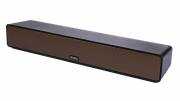
As fate would have it, USB Fever provided me with the Super Notebook Stand-Monitor Combi to review. The stand is a non-homemade version of the product I was wanting in the summer. The stand not only lifts my monitor up to create space, it holds many desktop items and solves the problem I had from downsizing my desk. See what all the Monitor Combi offers and how well it worked for me after the break.
Posted on 09 March 2010, at 4:00 pm, by Francis Scardino

Newsy takes a different approach to delivering the latest news content over the net. Their unique method of  compiling the same news story from many different sources gives you all angles and aspects of each story through various news agencies. The site has an easy to use interface and it is simple to search out the story you are looking for. Overall the site is quite impressive, the news delivery is great and the site is free to subscribe to. Lets take a look at the mobile app offered through the Android Marketplace.
Posted on 09 March 2010, at 3:08 pm, by Allistair Lee
Be.ez (be easy), a French brand that designs stylish accessories for the mobile lifestyle, announced a new addition to their popular line of protection sleeves for netbooks – LA robe Netbook 11.6. This netbook sleeve is nicely made with a very thick shock absorbing material, and it’s available in 2 different colors — Black & White and Red Kiss.
So, how good is this sleeve in doing its job, protecting your precious netbook? Read on to find out!
Features:-
Posted on 09 March 2010, at 2:30 pm, by Larry Greenberg
If there’s one thing I can’t stand it’s wasting money. It’s happened to me too many times to count. I buy at hot new application for my iPhone in the iTunes App Store, the day it gets released and then a few weeks later see a tweet that the same application I purchased is now available for half what I paid or worse, it’s free.
There are a few applications for the iPhone that allow you to track when apps go on sale or become free, but that means I’ve got to load yet another application onto my already crowded phone.
AppSpy.com is a web site devoted to tracking iPhone OS applications, specifically games. You can log into the site and tag games for tracking. You’ll then be alerted when the price of the app drops or goes on a special one day sale etc. Once you complete the free registration process notification on your apps come in the way of an e-mail alert.
If you don’t wish to tag any games, you can simply browse the list of prices drops that the site presents each day.
In addition to the tracking service AppSpy also features reviews so you can read up on potential game purchases and get advice from other users. The site promises up to six new game reviews each day, including video reviews as well.
So if you’re tired of over-paying on games for your iPhone or iPod Touch, head on over to AppSpy and starting tagging.
Posted on 09 March 2010, at 1:00 pm, by Michael Anderson
Comic courtesy of Penny Arcade
I have already talked about the new DRM system Ubisoft has implemented in their games starting with Assassin’s Creed 2 – basically even for single player offline games you need to be constantly connected to the internet or the game boots you out and you lose all progress since the last checkpoint. While I bristle at the thought of such a system, I do accept that publishers need to find a way to protect their property from improper use and outright theft. I started writing this with a few quick ideas about how to make that system actually work a bit better, but so much has happened in the last few days that I need to talk about those first.
Posted on 09 March 2010, at 11:00 am, by Carly Z
Businessweek recently ran a story about a side of Microsoft we do not hear nearly enough about. Apparently they have been working with various cities to bring computers to senior citizens. With the dependence on computers today, it has become tough for homebound elderly people to remain connected to society without them. Microsoft is pushing ways to make it easy for these people to have computers, internet connections and email without it being overwhelming and impossible.
New York City is piloting this program in Queens, but Microsoft has already successfully been running it in Miami. What is really incredible is that this program is not just “here’s a Windows 7 PC, have fun.” This program is taking into account the special issues that come with working with the elderly, such as eyesight problems and unfamiliarity with computer navigation.
Posted on 09 March 2010, at 10:00 am, by Dan Cohen
M-Edge makes some great cases. I have seen their Kindle cases up-close and have been rather impressed with the design, materials and quality. Now they are jumping into the iPad ring with a host of different designs. As expected they look great. What is particularly striking is that if you go to the M-Edge web site you will see all of the other devices they support. ALL OF THEM ARE EBOOK READERS. Even as people debate whether or not the iPad is in direct competition with dedicated eReader like the Kindle and the nook it is clear that accessory companies like M-Edge sure see them swimming in the same pond.
Among the more interesting cases M-Edge has on the way are the Flip Jacket that “flips open vertically and utilizes a four-point mounting system to secure the device”, the Executive Jacket which “includes a fashionable and smart wraparound closure strap and utilizes a four point mounting system for exceptional device security” and the Platform Jacket which “employs an easel-style design that allows for hands-free usability”.
In all M-Edge has announced 13 different iPad carrying solutions. We look forward to reviewing many of them starting on April 3rd. Images and the full release follow.
Posted on 09 March 2010, at 9:00 am, by Carly Z
Tivo and I have been together a long time. Almost four years, which in the electronic world is practically a lifetime. Sadly, Tivo has begun showing signs of dementia; mainly, stuttering and freezing occasionally, and insisting on attempting to record from every HD channel FIOS offers, despite our distinct lack of an HDTV. Constantly playing whack a mole with removing HD channels from the lineup settings is not my idea of a good time, nor is it fun when I come home from a long weekend and discover Tivo has helpfully recorded the Verizon screensaver instead of actual TV.
So it’s time to start researching alternatives. My cable is through Verizon FIOS, and for one DVR they want $14.95 a month. Tivo is currently $12.95 a month, so the difference is minimal. It really comes down to features and the cost of the digital video recorder itself. Verizon’s is rented through my service, and Tivo is an up-front sunk cost.
Posted on 09 March 2010, at 8:00 am, by Dan Cohen
Poverty is nothing to joke about. And there is no doubt that there is too much suffering in the world. People are hungry, thirsty and fighting disease. And the lack of proper sanitation in much of the world doesn’t help the situation. That’s where the Peepoo comes in. The PeePoo allows people to sanitarily dispose of their excrement without the need for water AND it converts the fecal material into useful fertilizer. This is a serious product that has a serious, and positive goal.
Ah, the joining of science, agriculture and number 2.
But while the Peepoo looks to be an incredible invention, and one that could alleviate a good deal of suffering, with one page delineating the “Expected nutrients from one person” (and lines like this– “An average person excreted mass per year is 30-60 kilo faeces a year. Urine volume is dependent on water intake and of levels of perspiration due to manual movement and surrounding temperature. 1,5 litres are regarded to be an average quantity per day.”) they are just asking for people to make jokes.
![]()
And then there was this comment on the post “Another great product no self-respecting adult will ever ask for by name.”
And he’s right! The invention is great. It solves two problems at the same time (waste disposal and the need for fertilizer in poor countries) but the name… OUCH!
So let’s help the good folks behind the Peepoo. Let’s be their marketing team for a moment.
If you were part of the marketing team behind the Peepoo what would you name it? And remember- the name has to tell people what it is AND this is a family site.
via Slashdot
Posted on 09 March 2010, at 6:00 am, by Dan Cohen
The 15.6-inch Dell Inspiron 15 doesn’t have a lot of bells and whistles. Sure it has a 2.2GHz Dual-core processor, 3GB RAM, a 250 GB hard drive and Windows 7 Premium, but it isn’t all that exciting. Or is it? After all, did you ever imagine you could get a computer like this for the meager $399 our GearSponsor has tracked down. That’s right, for a netbook price you get this full notebook and you get it shipped free.
And speaking of netbooks, if you buy this GearDeal notebook for $399.00 you can also but a Dell mini 10v for just $149. (That’s $150 of the normal price of $299.)
So to sum up today’s deal- a 15.6″ notebook AND a netbook have an MSRP of $932 but you ca get both shipped for free for $548!
15.6-inch Dell Inspiron 15 2.2GHz Dual-core Laptop (and Dell Mini 10v) via LogicBUY.
Posted on 08 March 2010, at 6:00 pm, by Dan Cohen
all photos are thumbnails; please click to enlarge
I am doing more than ever before by way of shooting video these days. No, I’m not like Larry with his 3000 You Tube subscribers, but I am taking some video pretty much every day. In part, this is the result of the iPhone having a “decent enough” video recorder. More than that though, I have come to appreciate that there is nothing like video when it comes to sharing an experience or review with the world.

The iPhone is great. It allows you to shoot and then edit video on the fly. At CES it was often less than a minute between shooting something and it appearing on the site. Still, all that flexibility still doesn’t make up or the fact that the QUALITY of the video is only decent. I also have a Flip Mino video camera. It’s a standard definition version, so it’s not nearly as good or crisp as the new high definition ones, but it does the job. It has the advantage of including onboard storage that pops up as soon as you plug the camera into a computer’s USB port. Between the iPhone and the Flip, I have two okay ways to shoot video. Okay, but not ideal.
What I’ve really need is a pocketable high-definition camera. The problem with that? Price. Most high-definition cameras are relatively expensive, and I’m not inclined to pick one up when I’ve got “good enough” already. That was the reason I was so interested in seeing a new high-definition video from Aluratek while we were in Las Vegas for CES. The camera is small, pocketable, shoots video in high definition, and, better still, it can be found on Amazon for under $120. That’s right, you read it correctly the camera can be purchased from Amazon right now for under $120.
But for your $120 do you get your money’s worth? Let’s take a look.
Posted on 08 March 2010, at 5:00 pm, by Larry Greenberg
Back in June, Jason took at look at the Poynt application for the Blackberry OS. He called it a “staple” on his Blackberry and one of the best applications available.
Well Poynt is back, this time with a release for the iPhone OS. The free application hit the iTunes App Store early last week, and I’ve had some time to play with the all-in-one location based search powerhouse.
Has Poynt become a staple on my iPhone like it did on Jason’s Blackberry?
Read on to find out.
Posted on 08 March 2010, at 4:30 pm, by Michael Anderson

Image courtesy of Joystiq
I wrote about the speculation of a Mac OS X Steam release here. Now we have confirmation in the form of GameInformer article scans at PalGN showing that Steam is indeed coming to OS X, and that the sequel to the amazing puzzle-FPS game Portal will be simul-released on Mac & PC.
Some cool stuff:
For Mac gamers, this is the fulfillment of a dream that has been on hold since 1997 saw Half-Life (and Jedi Knight) pass the Mac by, with Valve placing the blame on Apple. For me, I love the Mac OS, but generally am in front of a PC because of the dearth of games available on the system (or in the case of Dragon Age, the lack of post-release support and content). So I am ecstatic for this opportunity!
In honor of this being a Mac related post I need to add …
Oh, and One More Thing … if gamers already own copies of Valve games on the PC, they will get the Mac versions of those games for FREE! That’s right, just log into your account, download Half-Life 2, and pick up where you left off!

Posted on 08 March 2010, at 4:00 pm, by Carly Z
The built-in Android calendar is ok, but has a few major limitations. One, the default calendar widget is awful. It’s small and doesn’t really share much beyond the upcoming appointment. Two, there is no task integration, so if you plot out your day based on tasks and appointments you have to move back and forth between two programs. While there’s no solution for a better native calendar app, there is a way to turn a portion of your homescreen into a Super Agenda view. All you need are two apps and some space on your homescreen.
First, you need one of two compatible task programs, Astrid or GTasks. Astrid syncs with Remember the Milk, GTasks syncs with, well, Google Tasks. Personally, I prefer GTasks, but Astrid is also an excellent task program. Both are free, but if you need serious task management I suggest Astrid. It offers tags, alarms, goal dates, final deadlines, and is generally a very powerful option. GTasks is a bit simpler, with just an area for notes and a deadline. No alarms or categories. For me, I prefer to keep all my calendar and tasks grouped in Google, but it is great to have options.
Posted on 08 March 2010, at 3:00 pm, by David Goodspeed
Didn’t Ford just give us a new Super Duty, like, two years ago?
Yes they did. So why a complete makeover for this segment?
The government.
Yes, lawmakers in our nation’s capitol have mandated stricter emissions guidelines for the (diesel-powered) heavy duty pickup segment for 2010 and automakers have hit the end of their “grace periods.”
Ford (with GM to soon follow and Chrysler did theirs last year) gave its Super Duty pickup line not only a pair of totally new engines and transmission, but decided to address the entire vehicle with this model makeover. The result? The baddest big boy toy to date from the big blue oval.