
How did you ring in 2007?
At about 11:50, I got online and placed my last gadget order of 2006 at the Fujitsu site, buying the T4215 Tablet PC. It has been an agonizing 20 days waiting for my first non-UMPC tablet to show up, but it finally shipped from Osaka Japan on the 15th and arrived late last night.
My original intention was to film an unboxing, but since I had already given up on delivery for the weekend and was in my pajamas with my hair piled on top of my head, the video idea was waylaid. 😉
But I did manage to take a bunch of photos before spending the rest of the night transferring everything from my Toshiba to the the Fuji. I’ll give a shout-out to the Data Drive Thru Tornado right now, which I had picked up at CES; it made transferring files from one laptop to the other a cinch!
So, on to the unboxing! Here is the inner box that was inside the plain brown wrapper…
Here is the configuration information for my particular tablet, lifted directly from the site when I placed my order: LIFEBOOK T4215,INTEL CORE2 DUO T7400,XP TABLET PC,1 YEAR,DUAL-LAYER MULTI-FORMAT DVD WRITER,2GB (1GBX2),120GB (5400RPM) SATA HDD,MODEM,GIGALAN,INTEL WLAN(ABG),BLUETOOTH,12.1 XGA INDOOR/OUTDOOR,MODULAR BATTERY (AE5DJ1E627550001).
Included in the Accessory Box were all of the recovery disks, Microsoft One Note, the AC charger and power brick, the extra battery, two screen protectors (which I managed to install without any problem, Jerry ;-)), a digital pen & tether, a PCMCIA slug, a screen cleaning cloth, a quick start guide, and a user manual (that I probably should read).
The T4215 comes in a paper-cloth bag.
The quick start guide is included inside the bag for people like me that might not bother to look at the manual before ripping everything else open and getting started. 😉
This is the top of the T4215, it appears to be a matte black magnesium, where the bottom half appears to be a matte silver magnesium – similar to the type that was used on the old Sony CL?E cases. Overall the tablet case feels substantial; there is nothing plasticy, cheap, or gaudy about it.
The Fuji measures 11.5″ wide x 9.5″ deep x 1.5″ thick, and it weighs about 4.3 pounds when the weight saver slug is in the CD/DVD/Battery Bay. Of course, I’ve already popped the extra battery in the bay (after using the CD module last night for installs), so it weighs closer to 5.5 pounds.
Speaking of batteries, according to Fuji:
Main battery: Lithium ion (6-cell, 10.8V, 5200 mAh), 56.16 WHr)
Modular Bay battery: Lithium ion (6-cell, 10.8V, 3800 mAh, 41 WHr)
Bridge battery for warm swapping of primary battery XGA model: up to 6 hrs with main battery; up to 10 hrs using both main and modular bay battery
This is the underside of the tablet. Just as my Fujitsu P2110 (known in its former life as mini-me) did, the T4215 has patches of non-slip moleskin on the bottom. Since I have had my Fuji P2110 since 2002, I can verify that this moleskin holds up very well – it doesn’t eventually peel off or get flaky.
The screen/lid is kept shut by a latch which is released when the button in the middle of the silver bottom half is pressed.
I have grown so used to the squished view of a widescreen that the 9.75″ wide x 7.25″ tall (12″ diagonal) screen seems almost square.
Here it is without the protective foam insert. The keyboard is a little bit tighter than the full-size one on my Toshiba was, but it is comfortable and other than a few layout differences (like a moved Delete key), I am having no problems growing acclimated to it. The touch pad is textured, which I really like! The one on my Toshy was a bit too slick, this one feels better and more responsive under my finger tip. I am sure this is a personal preference issue, of course.
This is the legend of all buttons and ports under the T4215’s hood:
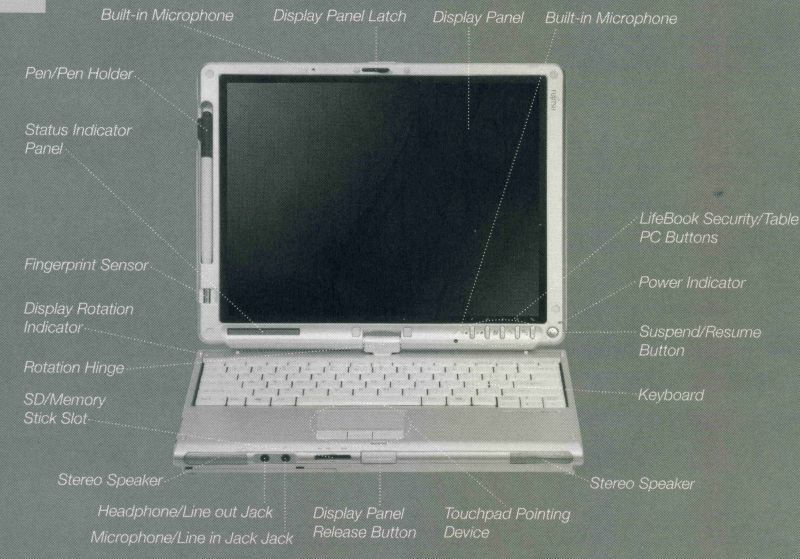
photo courtesy of Fujitsu
Click thumbnail to enlarge
This was the first time I used the dual-direction rotating screen; the hinge feels rock solid, and there is no wobble – yet! I’ll report back after I have been using it for a year. 🙂
There is an interesting dual clasp design which allows the same lock to be used when the T4215 is in laptop or tablet mode. Since swapping modes basically means turning the lid and laying it back upon the base facing the opposite of the original direction, the clasp flips up or down to accommodate whichever way it needs to be oriented.
For instance, in laptop mode the screen would face the keyboard, and the clasp would face down from the screen.
This is a view of the hinged side when the T4215 is in tablet mode. Although the screen can be turned either to the left or the right to open in tablet mode, when held in tablet orientation the hinge will always be on the right side of the screen.
This is the legend of all buttons and ports on the T4215’s hinged side:
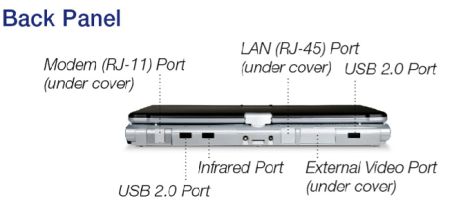
photo courtesy of Fujitsu
This is the top edge of the tablet, the power button is in what would be the upper right corner, and there is a status LED right next to it.
This is the legend of all buttons and ports on the T4215’s left side:
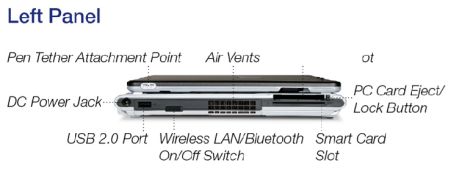
photo courtesy of Fujitsu
…and here is the legend of buttons and ports on the T4215’s right side:
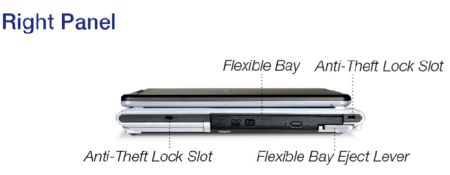
photo courtesy of Fujitsu
Here’s something I may or may not ever really use – the biometric fingerprint scanner; it sits catty-corner to the system status LCD window.
Here’s a shot of the included active digitizer pen. Since the Fujitsu does not have a touchscreen, as Jerry covered in his overview, but instead uses an active digital screen, you have to use these special pens with it to actually write. It’s nice that the stock pen comes with a bundle of refills…but it feels cheap and light.
So upon Jerry’s recommendation, I picked up a Cross Digital writer. It’s very niiiiiiiice. 🙂
But I can keep the extra “pen” in the slot just in case; it’s always good to have a spare.
Last up is the extra 3800mAh battery that swaps in and out of the CD/DVD bay, replacing either the player or the lightweight plastic slug.
Well…this is the first article I’ve written with the Fujitsu. Overall, I am pleased with just about everything. I explored inking for a little bit last night, and I did a couple of the included tutorials. Obviously I have a lot of catching up and learning to do, but the good thing is that there are a lot of resources out there for me to explore.
More later…!!! 🙂


Very nice!! You will be glad of the modular battery. I miss that from the Dell Inspiron 8600.
WOW,WOW,WOW! So nice!
I love it! This whole inking thing Rocks!
“The keyboard is a little bit tighter than the full-size one on my Toshiba was, but it is comfortable and other than a few layout differences (like a moved Delete key), I am having no problems growing acclimated to it.”
Is the delete key in the upper-right (where it rightfully should be, imo) or down beside the spacebar like it is with all the Toshiba’s and a few other model’s I’ve seen?
It took me forever to get used to the delete key being beside the spacebar on my Tecra M400 (which I should have back on Thursday after it decided to die on December 7 and I took it in to Calgary (our nearest major centre) on December 14th, and the place I took it to only got around to looking at it last week even with repeated phone calls from me asking what the status is 👿 ) but I’ve been trying to untrain myself from reaching for the delete key down there as I plan to order a non-Toshiba machine on or very shortly after Vista day.
Whoops, that should be Tecra M4. I’ve been without it that long! :shocked:
Congrats Judie! It reminded me of the fun I had unboxing mine! I still don’t know how you got the dang screen protector on!
Chris (ct) – you would like it because the Delete button is in its ‘proper’ location. I have been using the Toshiba Satellite A-105 since September (which had required relearning the Delete button’s ‘new’ position), so I was back at square one.
But I am already becoming acclimated – plus I have been doing a lot more handwritten entries, which just require a quick scribble. 🙂
Jerry – the screen protector has three layers – is it possible you only pulled off the first one (the really sticky one)? That leaves a smooth and non-sticky harder protector, which looks like it should go one but won’t. I remember looking at the thin sticky wad I had just removed, thinking “I know they can’t expect me to put this mess on my $3K tablet! 😉
They don’t.
You then have to remove a second film from the opposite side of the stiffer half. Once that peel has been started, you can install?it like any other silicone-based screen protector. I used an ID card, and managed not to get anything under the protector – not even a stray bit of dust…I think that was a first for me. 😛
I didn’t read the user’s guide, so I can’t say if there were instructions anywhere, but I figured it out based on past experience of hitting the same snafu with the PDA versions while reviewing them. 🙂
There weren’t any instructions that I could find. I was looking at that stiffer plastic sheet wondering the same thing. I gave up too quick! Oh well, I can order a couple more off of the Fujitsu site!
Grrrrrrrr!
Jerry – you know better than that! I ordered extras – let me send you another. 🙂
Too late! But thanks! 🙂
Hi guys,
Very nice review Judie!
I just received my fujitsu T4215 =) I noticed, it does a weird sound when powered with battery. The sound is very acute.
I would like to know if you have any idea why it does that. Is there any drivers not correctly installed?
Otherwise, it is a very very great tablet PC I like it!
Thanks.