
[Note: This is a joint review between Clinton Fitch (Dot) Com! and Gear Diary, and it is being simultaneously posted on both sites. Clinton's comments appear in black; Judie's comments appear in italics.]

I love card games.  From the first time my mother taught me how to play Spades to my addition on Free Cell on Windows 95, card games have always been at the top of my list of things to keep myself entertained (Nintendo Wii aside of course).

I was more of an Uno kid while growing up, but once I discovered Solitaire, Pyramid, and Poker, I was hooked. Being able to play these games on a computer was the ultimate in convenience – no shuffling, I could play these games by myself, and learning intricate card layouts was not required…yay! The first card game I remember playing on a PDA was Pyramid, on my Casio Zoomer in 1993ish, I scratched that screen terribly!

While there have been a slew of card games made available for the Windows Mobile platform, few have had a comprehensive list of different types of card games you can play or, even worse, did not perform as well as they should have or were expected too.

That has changed with the release of Astraware Solitaire from the UK-based developer Astraware.  This collection of no less than 12 individual card games has a great range of difficulty levels, “luck” levels and packs hours of fun for players.  Top off the smooth game play, the variety of games and options and a Trophy Room to help celebrate your victories with great graphics and you end up with what has easily become the best card game application I have ever reviewed for Windows Mobile – hands down!

I would have to agree! Normally I don’t like to start a review by lauding the praises of the product, but from the moment I loaded an early release, I knew that Astraware Solitaire was going to be installed on all of my PDAs – present and future.

Astraware Solitaire is installed on your Windows Mobile Professional device via ActiveSync or Windows Mobile Device Center and requires approximately 4.7MB of storage space on your device.  You can installed the application on a storage card or in main memory, and your device must be running PocketPC 2002, 2003, 2003SE, Windows Mobile 5 or 6. Astraware Solitaire supports both QVGA and VGA and square screen devices, it is also available for Windows Mobile Standard devices.

Well, while we are listing the OSs that it plays nicely with, we should also mention Palm. As usual, Astraware has all of the popular formats covered.

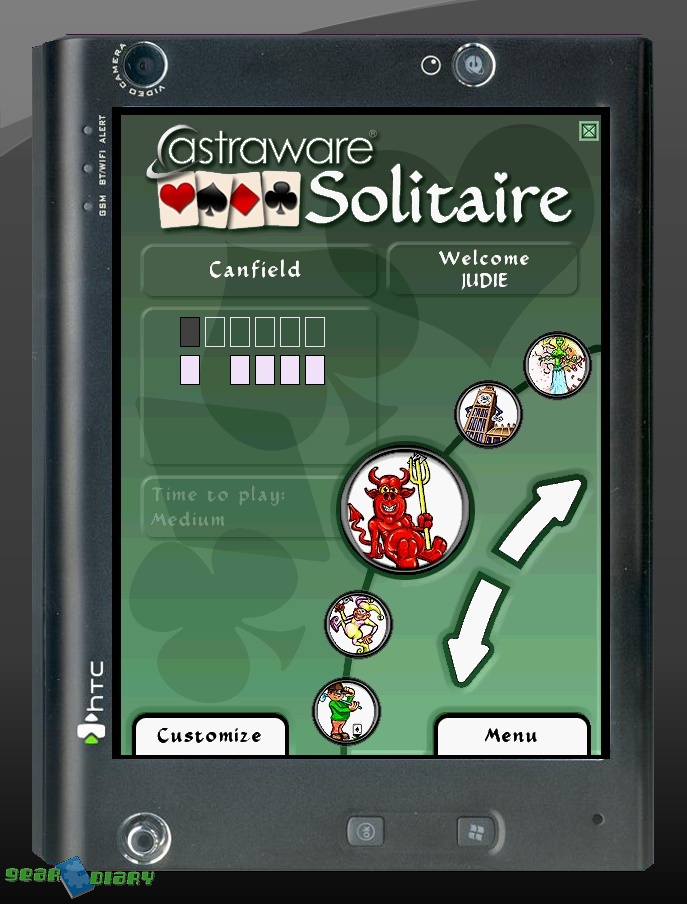
When you start Astraware Solitaire for the first time, you are prompted to enter your name or alias. By doing this, all of your achievements will be tracked by the game which is important for the Trophy Room and your statistics.  With your name entered you are sent to the main screen of Astraware Solitaire which is where you can choose your game, see the luck, skill and difficulty of each game as well as the time required to play that game.  The range of games offered is impressive, ranging from the almost universally known Klondike to the lesser known and more difficult Calculation.

The graphics used on the main menu were my first hint this this game was going to be something special – they are engaging and humorous.

To change the game you wish to play, tap the up or down arrow on the main display to rotate to the games available or use the up and down functions of the D-Pad on your device and the Action button to select the game.  When you change games, the information related to that game changes as well.

The right side of the screen features two arrows that when pressed create a dynamic scroll, through which the twelve games will rotate. Specialized circular icons for each game are displayed, with the featured game’s icon magnified in the center.

Continue Reading