Posted by Judie Lipsett in Uncategorized
After saying I would eventually get one, for more years than I care to count, I pulled the trigger tonight and bought my first Mac: the 15″ MacBook Pro.
Isn’t it lovely? This is the newly announced version with the Multi-Touch trackpad, an Nvidia GeForce 8600M GT graphics processor (256MB of video memory), and the new Penryn processor.

Posted by Judie Lipsett in Uncategorized
One of my best friends just sent this to me, and I about fell over when I watched.
The item in the video starts off looking like a big fat flashlight…and then, as the demonstrator says, this MAGPUL Industries FMG9 concept idea (that they say they have no intention of producing) is very “transformer-ish”, and if you are walking the dog, taking out the trash, and any “problems occur and you need immediate action, you can get on target and go with it.”
Did I give away too much? Watch the video…
I’ll leave it to you to see exactly what this product is, but holy cow!
Thanks for the tip, Grabb!
Posted by Christopher Spera in Uncategorized
I’ve been having this conversation with Chris Gavula on and off for about six months now: what is the huge draw for 3G cellular speeds here in The States? With 3G coverage so sparse here, and all of the cell carriers and device manufacturers and OEM’s barking about how this device or that device does 3G, it kinda makes me wonder… So, after listening to one of the latest MoTR podcasts, I finally decided to buckle down and create (what I am certain will be) the buzz that should get everyone thinking (and hopefully talking…) about it – Here in the States, what is really the big draw for 3G; because I really don’t think the masses care, know what it can offer them, or even really care (did I just repeat myself..?)
Posted by Mitchell Oke in Diary Entries
CD Printing at home has been around for several years now, negating the need for sticky labels that make the disc so thick that it won’t fit in a laptop drive properly. Dymo, famous for their many label-making solutions, have entered the market with the DiscPainter, a stand-alone CD and DVD label printer that prints directly onto blank discs in around 60 seconds.
In the box is the DiscPainter, a quick-start guide, registration card, ink cartridge, 3 blank printable discs, AC adapter (110-240V, works anywhere in the world) and surprisingly a USB cord. Seems these days the vital link between the computer and the printer is being left out, so it’s nice to see it included.
Before you can get started, you need to remove all the bits of cardboard and Styrofoam used to protect the printer during shipping.
Inside the cartridge lid are instructions on how to put the cartridge in. It’s a similar setup to HP printers of old.
An indicator key lets you know what the two lights on top of the printer mean at any given time. To be honest I’ve never found “General Error” to be very helpful ![]()
Included with the printer is a single ink cartridge. According to Dymo’s website, the cartridge is good for about 100 discs, which at $40/cart. is 40c a disc, a tad pricey if you ask me.
The AC adapter will work anywhere in the world, so if you decide to import one of these all you will need is a plug adapter, or one of those 8-style cords with your country’s plug on the end.
Before hooking it up to your computer you need to install the software. This will install the printer driver, as well as the DYMO label creation software.
Select your language, and the rest of the setup is straightforward.
Once the setup is complete, connect the printer and it will automatically load the driver.
Now it’s time to create some labels! This is where the DiscPainter truly shines. The software included really is fantastic.
Start off by selecting a label type. In this case we are using the DYMO DiscPainter template for 12cm discs. If you are using 8cm discs select the 80mm template.
The amount of customisation offered is excellent, and just as importantly, it is easy to use.
The “Paint” tab lets you draw shapes, lines, fills and sprays.
“Symbols” adds a nice logo to your discs, to let people know what type of content is on the disc. They aren’t the usual logos you see on discs in the shops (the logo is likely copyrighted), but they are more than clear.
“Grid” makes it easier to line-up objects on the canvas, so you don’t get crooked looking discs. This feature is very useful when using shapes.
“Canvas” applies a background colour to the disc, and can add feathering to the inner or outer perimeter. You could also choice from a number of preset background images.
Using “Photos”, you can insert JPG, PNG, BMP, GIF and PCT images to your canvas.
The image can then be cropped, resized, rotated, framed and shadowed.
Of course you will want to add some text to your label. The text is quite similar to WordArt in MS Word, with plenty of formatting and style options available. It’s very easy to make a a label that wraps around the disc, in spirals, or if you feel like going a bit crazy, in a straight line!
Here is my finished label, ready for printing. You need to specify the inner diameter of the label (some discs have a printable surface right to the centre, others have clear plastic in the middle), as well as the outer diameter. The quality of the printout can be adjusted for better results, at the cost of longer print time and ink usage.
When your ready to go put a disc in the printer…
…and hit Print!
The disc will slide into the printer on a tray, and will be printed on whilst spinning, a technique dubbed by DYMO as “RadialPrint”.
It feels like you’re waiting for a microwave, all that’s missing is the “ping”.
Anyway, when it’s done, pop the lid and you’ll have a colourful disc.
The print quality is very good, the discs look very professional.
While the quality of the output is very good, it isn’t really any better than my Canon printer that I normally use for disc printing. The problem I have with the DiscPrinter is it is not a cheap device at $280, and doesn’t produce labels better than my Canon MP760 that I bought over a year ago for similar money. The Canon has it beat since it can print to regular paper as well, the cartridges are cheaper, and are in individual colours (so you don’t throw away all three when only one may be empty).
The software that comes with the DiscPainter is very good, and makes it easy for a novice to produce fantastic looking discs, but the high price-tag of both the unit and the cartridges ($40) put me off.
The DYMO DiscPainter can be bought direct from DYMO and other retailers.
MSRP: $279.95 for printer, $39.95 for cartridges (1 included)
What I Like: Exellent, easy to use software, good quality output
What Needs Improvement: Too expensive for a one-trick pony that’s not much better than a regular inkjet with disc printing capability (if at all)
Posted by Judie Lipsett in Diary Entries
Judie: I have alluded in the past to the fact that Gear Diary Team emails can be quite entertaining as well as enlightening. Sometimes we talk about meaningless subjects - like the press release that came through today for NBA Jersey air fresheners. Other times, we talk about things that we aren’t ready to put into an article, but that are on our mind.
Today Wayne kicked off just such an email which many of us soon chimed in on, and I thought it would be fun to let you all peek in on some of the stuff we talk about behind the scenes. Grab a cup of coffee (or tea), and come join our conversation…
Wayne: Did you guys see this writeoff — $ 29 BILLION — and bleeding 1 million + customers per QUARTER….
Is there any way that Sprint can remain independent? About the closest match now would seem to be Verizon who uses the same CDMA technology.
IMHO, aside from the technical problems, these guys really lost it with the Nextel acquisition. There simply was not any synergy between the technologies. They bought one of the most profitable niche players and literally destroyed them.
Now you could debate whether Nextel could stand along with their iDEN technology — but geez — $29 BILLION writedown….WOW
Posted by Joel McLaughlin in Uncategorized
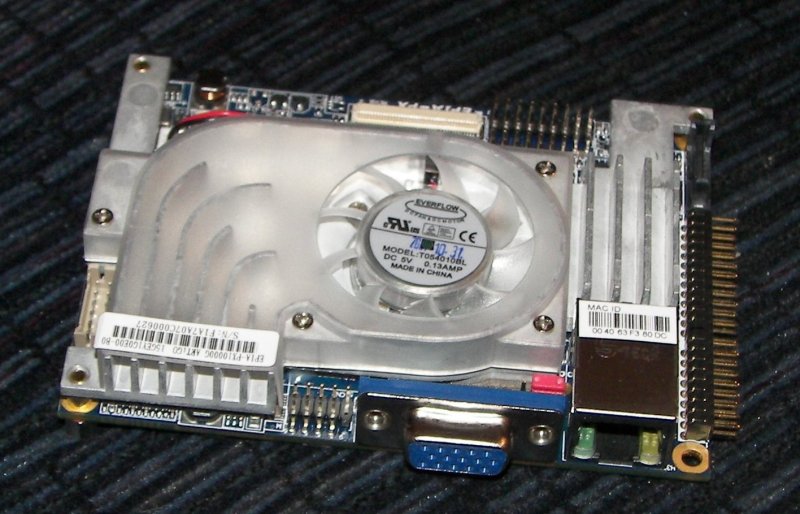
We’ve all seen the mini PCs like Lenovo’s Thinkcenter Desktops and Dell’s small desktops. We’ve also seen other PCs about the size of a external CD rom. Now, we have one that’s about half that size. VIA had brought out the Artigo Builders Kit. The motherboard on the Artigo is about the size of a credit card but is about as thick as a stack of credit cards. The whole PC is designed to fit in the same slot as your desktop’s DVD drive. You can take multiples of these and install them in a standard desktop case; it is that small.
Posted by Judie Lipsett in Uncategorized
Go ahead and mark your calendar now for March 6th at 10:00 am PST, as that is the day Apple will hold an intimate gathering where they will announce details about their iPhone software roadmap, which according to PhoneMag includes “the iPhone SDK and some exciting new enterprise features”
Ooooh…”enterprise features“!
Does this mean I finally get Exchange on my iPhone?
I’ll post the actual web address for Vincent’s live coverage as soon as it’s available. ![]()
Posted by Mitchell Oke in Reviews
When I bought my new car in September 2007 I knew I would be keeping it for a few years, so I decided that I was going to take the plunge, and build a Car PC like those that I had read about on the MP3Car.com forums. The computer would replace the standard audio system, and add MP3 playback, video, GPS, GPS tracking and internet access to my car
After months of dreaming about such a setup my Car PC is finally installed. I’ve had the computer on my desk for over 3 mths now but time and money kinda pushed it WAY forward to this day. Since my dad was off work for the Australia Day holiday, we decided it was time to tackle it.
Posted by Doug Goldring in Reviews
[Note: This is the second part of my look at the Toshiba Qosmio. For my unboxing and initial impressions, take a look at Part 1]
When I first started looking at the Qosmio laptop, I thought I was going to have a panic attack. There were just so many different features here. How was I possibly going to discuss them all? Was I in over my head? In fact, I came close to wondering whether I should have asked for it at all. Yikes! Talk about a crisis of confidence. Luckily, I had a chance to discuss this with Judie, who put it all in perspective. “Just talk about your impressions…your impressions.” She said. And with that last phrase, “your impressions” echoing in my head, I set out to take a look at the Toshiba Qosmio G45-AV690 multimedia laptop.
The Qosmio is decidedly NOT the MacBook Air. In fact, I would call it the “anti-Air”. Is that a bad thing? Not at all. Taken together, the Air and the Qosmio really highlight the difference between mobility and portability. Mobility offers the opportunity to access your data from anywhere at anytime; often at the cost of usability or other functions. Portability allows you to carry everything you need from point A to point B, even if you cannot easily access that data before reaching point B.
To put it another way, the Air takes a shoebox and says put all of the features you can fit into this box. The Qosmio, which is a portable laptop, looks at a pile of features, takes them all and builds a box around them. Trust me, with a 17 inch screen and weighing in at 10 pounds, you are not likely to confuse this portable device for a mobile one.
Posted by Judie Lipsett in Reviews
When Sarah and I traveled to Amsterdam, I was trying to travel with the lightest gear possible, so I brought along my HP TX1327 which easily fit into a sleeve inside my carry on. But when I went to CES, I wanted to bring the laptop I most enjoy writing on - the Toshiba X205. Now here’s the thing: the X205 is a 17″ beast, and I knew that it wasn’t a laptop I would be toting on the floor or bringing to meetings; I just wanted my laptop in the hotel room, waiting for me at night when I was ready to write daily recaps. So what I needed to make the trip was a carry-on bag large enough to accommodate my laptop and hopefully carry other items, too.
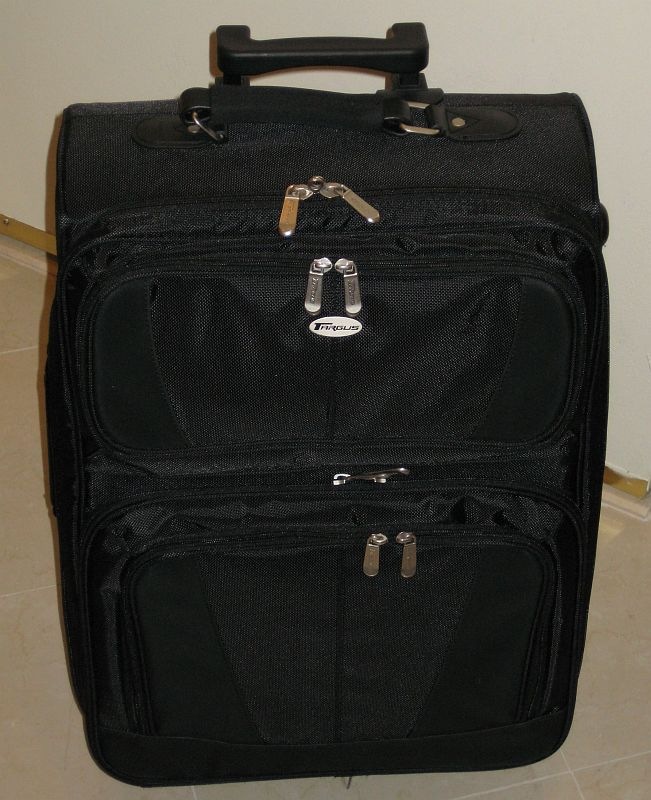
I soon found out that there really aren’t that many bags which can handle such a tall order, as it would seem most bags cap out at the 15.4″ screen size, but I did find one - the Targus 17″ Trademark II Overnight Roller. It wasn’t only a laptop carrier, it was also made to carry a couple changes of clothing!