Judie: We can’t be in Barcelona for Mobile World Congress, but thanks to the generosity of Scott Rockfeld at Microsoft, we can show you some screenshots of Windows Mobile 6.5, which is officially being unveiled at the show. Rather than post just one person’s thoughts, we decided that this would be a good time to give impressions from several very opinionated people.

Bear in mind that these are judgments based on what is shown specifically in the screenshots, and that we recognize there are likely features present which may not be evident by the pictures shown.

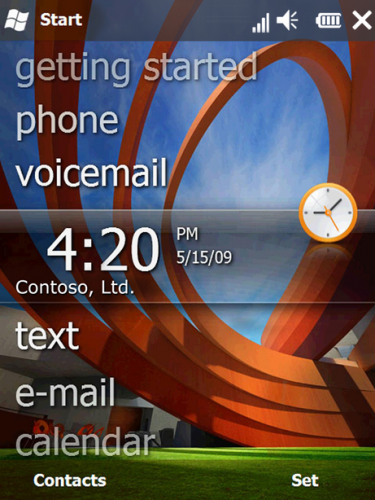
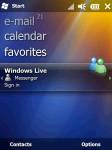
Let’s start with the newly designed Home screen…

prithvir

Judie: Hmmm…this should look familiar to anyone with a Zune. ;-) I like the use of lowercase letters, but I wonder if it will seem too informal to business users. I also like the immediate information given by the numbered notations on email.

Christopher Gavula: I like the new look overall.  I’m a big fan of usable interfaces and I felt the old WM learning curve was a bit high.   I really think MS is headed in the right direction with this redesign.   As I mentioned – I like this look, but I wish the numbers for calls/emails/etc. stood out a bit more.  Maybe making them a different color from the other text?  I agree, the “feel” is friendlier – more casual.  I don’t know how this will sit with the business set, but it should sit well with consumers.

Chris Spera: Exactly, Chris… From a consumer point of view, this is pretty nice, but I’m a business/professional user, and I want my meeting schedule on my home page. I want to pull the device, turn it on, and see what meeting is next.  If this doesn’t do that, I’m not gonna be a huge fan.

Wayne: Reminds me of a Zune. As I’m looking at the first image I’m wondering what’s going to be under the hood. Is this more attractive home screen just a coat of paint? I’ve got $10 that say’s this glossy opening screen is the most noticeable improvement to the OS upgrade.

Doug: I really like the fact that Microsoft has gone back to the drawing board and completely started from scratch.  This constant tweaking of a 10 year old design was getting old.  I also really like that they did not fall into the trap of copying the iPhone.  The great thing here is that it is completely finger friendly, but does not resemble the iPhone at all.   In fact, I love the fact that they are essentially incorporating something like the Zune interface.  I have been saying for some time that it really makes no sense for the Zune to be a seperate device from Windows Mobile.  I hope this marks a merging of the two.

I do agree with Chris though.  I am one of those people who really likes my calendar to smack me in the face when I turn on my device.  What I hope is that there will be some kind of popout.  So, tapping calendar would just expand that entry on your homescreen to display additional information about your upcoming appointment (which is what appears to be occurring with the clock in this first picture).

Judie: Right Doug. I think that tapping each entry will either cause other options to pop out or take you right to the application, but they will stay collapsed unless tapped. If that’s the case, so far so good…

Clinton: I really, really like this interface change. This really makes it quick and easy to get to the information that is important to me. This could very well be the source of the “Zune Phone” we’ve been hearing over the last few months. I like the Zune, so I guess it’s no surprise that I like this as well.

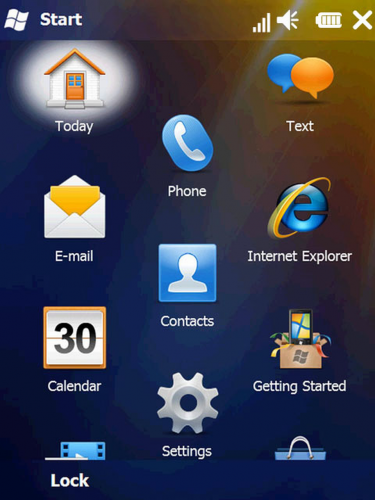
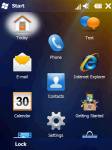
Judie: This is the new “honeycomb” Start Menu…

pc_capture4

Judie: I am not too thrilled with this design, but it does look much more finger, or touch friendly.

Christopher Gavula: The honeycomb is definitely finger-friendly, but I’m not sure if it’s a good design.  It does stand out and it is memorable, however.  It’s a bit cluttered-looking, though.  I’ll be very interested to see how it behaves in actual use.  It may be very functional or it may be very clumsy.  I understand that the motif is expandable, scrolling each way as needed.  Again, I’m not sure if this is going to work for people or not – I guess we won’t know until we see it in the wild – but I AM glad to see MS actually trying to innovate a bit here.  Now – is there a button that would always take you back to the center?

Chris Spera:  I hate this design (can I use the word hate..?)  MAYBE we needed a new paradigm for this, but I don’t think this is it at all… Has anyone seen anything on how this is configured, or if its even end user configurable/changeable??  Blech!

Wayne: Hmm interesting – especially since WinMo doesn’t support capacitive touch. Don’t think I’d ever go back to stylus. This is too busy for me.

Doug: I think Chris hit the nail on the head.  The real key here is usability.  from the picture, I like what Microsoft is doing here.  This is a unique design which really makes the platform stand out.   Again, I like that Microsoft achieves this finger friendliness without just copying an iPhone-like interface.  On paper, I really like this approach, because it caters to people who use their devices by muscle memory.  If I know the phone is always in the center then I don’t even have to look at my device to hit that big button.  This is an important aspect of using a mobile device, and one which Microsoft never really incorporated.

I may still decide to hate this approach after I have had a chance to use it.  Based on these pictures, I do have some questions about customization and usability.  But so far, I like what I see.

Clinton: Sounds like I may be the only one that really likes the honeycomb approach. This to me is far, far better than icon menus of the current version. Not only is this far more finger friendly it makes it much more difficult to hit the wrong icon on the screen. This bigger target area is a big improvement!

Even better though, this new honeycomb menu is not just at the first layer. If you were to tap on settings and go deeper into the system, you will continue to see this honeycomb menuing. It isn’t just superficial.

Doug: No, Clinton.  You are not the only one who likes it.  I like it so far.  I guess I would say I am cautiously optimistic.  But there is just too much that I cannot tell from the pictures to be able to say for sure.

Judie: I assume that like the original Start Menu, users will be able to decide which programs they would like to include?

Clinton: That’s right Judie. You can customize this to include whatever programs you want. Again, it drives toward the Microsoft emphasis of making the device a tool to get to your information.

Doug: I think that is a critical component which gets overlooked.  A lot of the shell applications I have used make it easy to get to the places they want y0u to get.  For me, the real winners are the ones that make it easy to get to the places I want to get!

Wayne: I recently tried out a T-Mobile Shadow. I really loved the opening screen and how it could be controlled with a little wheel. Then when I clicked through to the underlying operating system I put it down quickly. The big WinMo icons just make me shiver. I just get this whole “outdated” feeling when using the OS.

As I’m looking at these screen shots I’m thinking that there’s not a lot of “under the hood” photos of the apps or web browser. Oh yea, that little issue of web browsing…

Doug:  That is a great point Wayne.  One of the big problems I had with Touch Flo 3D was that all of the changes were cosmetic and nothing more.  Underneath, you still had the same clunky Windows Mobile.

Clinton: That’s the good thing about this release Doug – it isn’t just surface or 1-level deep. They have changed virtually every aspect of how you interact with the device.

Doug:  I am glad to hear that, Clinton.  I think it is exactly what they needed, and long overdue.  Like I said…cautiously optimistic.

pc_capture6

Judie: It also looks like the screen itself can also be arranged, allowing the user to customize their placement.

pc_capture5

Doug:  Customization is critical in an interface like this.  If I cannot put my most used apps or actions where I need them then the whole honeycomb thing is useless to me.

Clinton: The screen is customizable so you can put the most important things for you on here. It goes with Microsoft’s “you” centered strategy and not a device centered view. You put the information on here that is important to you. I like it the change in perspective personally.

Doug: I agree, Clinton.  This change in paradigm from a device centered approach to the user centered approach may be the most important decision Microsoft has made since the Pocket PC was originally introduced.

Chris Spera: Again, changing paradigms = good. I just don’t like the honey comb thing. I know MS is trying to stay away from pages and horizontal flicking motions to page through them, but I really just don’t like this. I think its a bit on the hokey side, and would rather see something else.  Now, in defense of MS, I have no idea what else I would like to see.  I know that I just don’t like this…

pc_capture9

Clinton: Yeah, like I said, customizable!

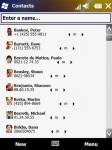
Judie: I like the tabbed Contact cards…

Christopher Gavula: Yup.

Chris Spera:  Tabbz…we haz ‘em… Very nice implementation, by the way. Its clean and seems easy to use.

Doug: They are very nice.  Though I still think the contact cards in Mobile Shell were the best.

contact_screen_3

Judie: Okay, I thought for a moment that this was  a cool feature. It looked like tapping the EMail bar might pull up past emails between you and the selected contact. But instead, I think that it simply pulls up a blank email form for you to write on.

Doug: Yeah, but still… this is  an often forgotten feature.  Too many contacts programs do not allow you to send an email directly.   So, I am glad to see it in there.

Chris Spera: Judie, I like that idea! Too bad MS didn’t do it (yet..?)  What they did do, though isn’t too bad.

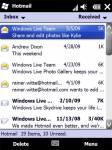
Judie: Here is an email seen in the new Outlook; it’s received a little bit of a facelift…

Doug: This is one of my big pet peeves.  Outlook Mobile is just terrible.  Next to Internet browsing, this is one of the areas that I think was most in need of a facelift…not to mention some long-missing email features.

Chris Spera: I SO agree.  Very well put!

Judie: I like that a photo of the contact is shown next to their message to you. If SMS messages do it too, then that will be very cool.

messaging_screen_3

Wayne: None of these contact and email screens do a thing for me. Sorry.

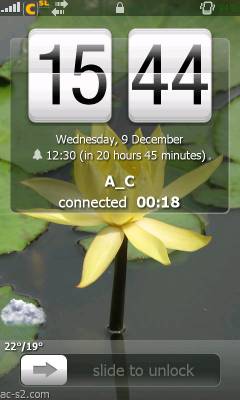
Judie: This is the new lock screen…

pc_capture1

Doug: I love this lock screen.  The old one was just so utilitarian.  But I hope there is an easy way to put all of that wasted screen space to good use.  I would be very happy if I could display my daily agenda on this lock screen.

Judie: This looks pretty handy – it appears that you can see how many calls, voicemails, messages or alarms you’ve missed – just by looking at the Lock screen.

pc_capture2

Clinton: Okay, this is one thing that rocks in 6.5. So you have all your messages, voicemails, texts, etc. on the screen. The cool thing is that with a single swipe you can open up the application to view that information. No multi-tapping to unlock then opening the application.

Christopher Gavula: I like this, but again, I think the numbers don’t stand out enough.  Also it isn’t clear what exactly the number next to the lock represents.  I’d rather see separate numbers next to each type of notification icon.

Chris Spera: The original screens we looked at had white text on a “traditional, Windows XP styled photo.  White text stands out well against the blue sky, not so well against the green grass.  The above water styled photo is much better with white text, however, it would be nice if this were customizable and you could choose your own photo.  In lieu of that, I think Apple had it right – Red circles/dots with white text. They did have something when they came up with that paradigm.

Doug: I agree as well.  I have always disliked having text overlayed on top of a photo for just this reason.  But I do think this screen looks like it is off to a good start.  I love that each option has its own unlock button.  It would be pretty cool if you could add applications to this.  So, for example, add a calendar app to unlock straight to your agenda.

pc_capture3

Clinton: The MVPs got to see Internet Explorer Mobile (that’s the name btw) in action. It is very, very similar to the user experience on Windows. I was quite impressed. The address bar is also the search engine entry and saves you quite a bit of time instead of having to, erm, search for the search box. When you have it zoomed in you will also see a breadcrumb in the lower left corner of the screen to where you are on the site as well.

They built this on IE 6 which is the most widely accepted standard for web site development (like it or not). That means that virtually every site that works with IE 6 will work with this – far outpacing the site support of any other mobile browser out there.

Christopher Gavula: IE6 is probably the LAST thing I would have based a new browser on.  It is NOT based on standards as much as it is based on MS-proprietary things like Active X.  The lack of standards support in IE6 and the special hoops required to support it are well-documented, not to mention its long history of security problems.  ”Ugh” is the only thing that comes to mind when I think of that browsing platform continuing in any form.  I will rejoice the day IE6 is finally done and gone, but it sounds like it won’t be today – pity.

Judie: So this is the new Internet Explorer Mobile (thanks for the proper name, Clinton). It reminds me a bit of Opera, but it looks to have added a few new twists. If it is based on IE6, then can we assume that sites which render poorly in IE6 will also be messed up in this? Hmmm…Gear Diary happens to have issues with IE6. Grrr…

pc_capture7

Doug: OK, seriously, I am impressed…really impressed by the pictures of this browser.  I think it goes without saying that Microsoft has taken more criticism over Pocket Internet Explorer than pretty much anything else they have done (except maybe Windows ME).  But I really see a huge step forward on this one.   I am glad to see that Microsoft is listening to the needs of the user community and updating the browser.   I wish it had been based more on Internet Explorer 7, rather than 6, but the fact that they are moving it all speaks volumes.

Chris Spera: As long as this surfs as well as it looks, then MS may finally have something. If this craps out when you hit Flash or Java powered pages, then I’m back on Opera or something else that supports real web technologies (like my laptop…)

pc_capture8

Chris Spera:  I really hope that the basis for the changes here is not simply a response to the iPhone, but is really a step to make Windows Mobile/Phone more end user (notice I didn’t say consumer) friendly.  I do not like some of what I have seen here.  Some of what is here, I like a lot. I am hoping that it includes support for ALL resolution devices, and that upgrades for existing devices don’t get stuck in the whole MS/OEM/Carrier black hole; but they likely will. It would also be nice to be able to get updates to a 6.5 device without having to wait on the OEM/Carrier to release them.  WM/WP has the Windows Update infrastructure built into it, why not use it??

Wayne: I wonder how the web browser is? Media player? I judge these release as much by what’s not depicted as by what is. Here’s hoping MSFT held back images for the official announcement. I think the days of the hardware devices with (way too easy to push) buttons slathered all over are coming to an end. I can’t stand the side buttons on my BlackBerry Bold because I’m always pushing them when I take the device out of the case. It’s really hard to tell anything from some screen shots, but if this is considered a complete set representative of the upgrade let me re-label this upgrade “Coat of Paint version 6.5″

Clinton: The browsing experience is much better Wayne, and Media Player got a significant improvement in this release as well.

Doug: I really like the originality of the home screen and menus.  I especially love the fact that the home screen appears to finally merge the Zune interface, which I have always thought was far superior to Windows Mobile, due to its ease of use.  But I agree with Wayne and Chris, it remains to be seen whether this is a top to bottom overhaul, like Windows Mobile needs; or whether it is just another shell on top of an unnecessarily complicated and difficult to use operating system.  Let’s be honest.  In 2005, Microsoft was pretty much the only game in town.  Today, we have a lot of choices: iPhone,  Android, a resurging Symbian system, Palm Pre and, of course, Blackberry.   It is a crowded field right now, and I think Microsoft needs to make a big move here in order to keep up.   Otherwise,  it might not not matter what comes in Windows Mobile 7 or beyond.

Clinton: I have to say that when I saw Windows Mobile 6.5 at Mobius in December I was completely underwhelmed (just ask Judie, I was sitting next to her voicing my displeasure). Having seen it in action though, I’ve changed my tune. I really think this is a step in the right direction for Microsoft and for Windows Phones. The key here is that this is not the full vision of what Microsoft has in store for Windows Phones. This is just the beginning but it is clearly a step in the right direction.

Christopher Gavula: I hope they ultimately address some of the “under-the-hood” things like memory management that have plagued the performance of WM.  I suspect, though, that will be in a version after this one.

Judie: Now it’s your turn to tell us what you think. Take a look at the screen shots, leave a comment below, and let’s continue the conversation…

Related posts:

  1. Windows Mobile 6.5 is Officially Released
  2. GearChat: Windows Mobile…Yeah, We Went There
  3. Microsoft’s new strategy: Windows Mobile 6.5 to compete with Android, and Windows Mobile 7 – with the iPhone
  4. Is Windows Mobile Still Relevant at JAMM
  5. GearChat: The Demise of Print Media and a Possible Reason for the Amazon Kindle