Posted by Dan Cohen in Diary Entries

I’ve been writing quite a bit about the Livescribe Pulse pen in recent days. It is a phenomenal device, and apparently there are many people who agree. I’ve received a number of private emails from people who have been using the pens or have just ordered them. (I’m pretty sure they’ll be happy the decision!)
I went to a seminar yesterday, and a friend who is not known for her technological prowess, proudly held up her Pulse pen and said “Have you seen this before? I love it.” I reached in my pocket and pulled mine out. We had a good laugh and then compared notes. We agreed, the Pulse pen is a keeper! A keeper… but not perfect.
One of the biggest downsides with the pen is the fact that it requires special paper in order for the pen to work its magic. Sure, you can print your own paper at home and use that, but that’s pain, and quite frankly, I really don’t bother with it. Fortunately, there are a variety of types of paper available from Livescribe. I’m using four different types of Livescribe Paper. The different types of paper each serves a different purpose, and there are different times when each is useful. I thought that we might take a quick look at each. Continue Reading
Posted by Carly Z in Diary Entries

Doubleday is now promoting Dan Brown’s new book The Lost Symbol. If you didn’t already realize it, Dan Brown is the author of the insanely popular bestseller The Da Vinci Code. Mention this book in polite company, and 10 people will give you 25 opinions. Or just ask the Gear Diary contributors and watch your inbox get flooded with responses.
So why is this big news for Gear Diary?
Posted by Larry Greenberg in Diary Entries

Any Apple fanboy or fangirl is sure to be familiar with Growl. For those of you who aren’t, Growl is system for posting notifications to the computer’s user. Growl uses a unique set of features to unobtrusively notify the user. It does so in the foreground, so you don’t have to do anything to see them and they usually disappear after a few seconds. The iPhone lacks any sort of informative notification system.
There’s hope that with the upcoming 3.0 iPhone software something will address the need, but for now there’s GriP. GriP – which is for Jailbroken phones only – was recently posted at Google Code, and it is now available through Cydia. GriP seeks to do on the iPhone, what Growl does for the Mac desktop .
Posted by Dan Cohen in Diary Entries
![]()
Pocket Informant version 1.02 should be out in the very near future. We have been fortunate to have Alex offer us some promocodes for the current version. That means some our readers will get copies of version 1.01 now and then, in a matter of days, get the upgrade to the new version which begins to add additional features to the task management side of PI.
Although early in its maturation process, Pocket Informant has become a key app for me. The WebIS site explains why quite well…
Proper to-do management is essential, but it’s only part of the picture. Pocket Informant is a full featured PIM, so it lets you focus on everything you do in a day – not just your to-do list. We believe bringing your appointments and to-dos together in one place is more efficient than working in isolated calendar and to-do management systems. Pocket Informant is designed to not force you into any one method of doing things. For example you can use our to-do View as rigidly or freely as you want, using GTD principles, Franklin Covey, or your own system. Pocket Informant also lets you sync your information with popular online services so you can easily access your data with any desktop computer or share it with others.
Posted by Drew Guttadore in Reviews

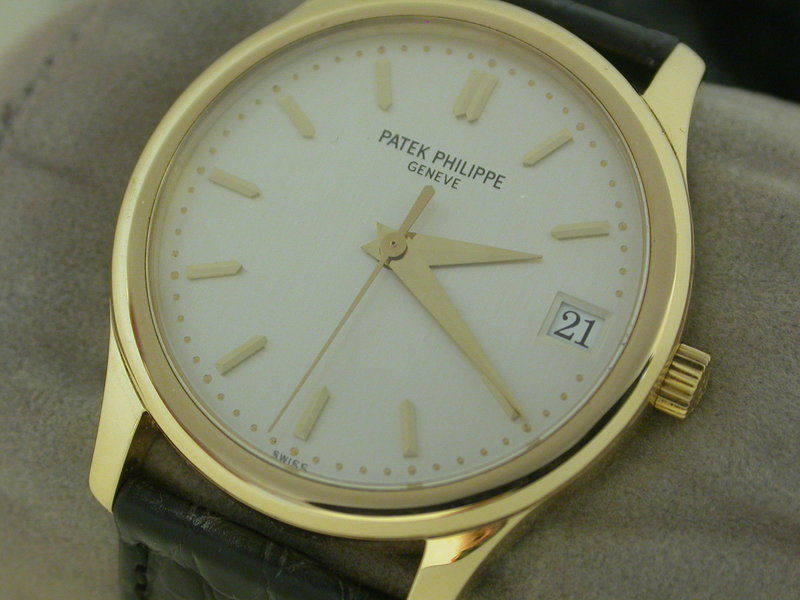
“You never really own a Patek Philippe, you merely take care of it for the next generation,” or so we are meant to believe. Rubbish! Buy one for yourself and if you are lucky enough to have a son who understands and appreciates it, you can then not concern yourself to its whereabouts beyond your earthly presence.
Posted by Dan Cohen in Diary Entries

The final promocode in this giveaway for Appigo’s Todo goes to reader fluffyone who entered while out on a camping trip, the planning of which was poor due to lack of organization. We hope the next one is a bit more together thanks to Todo!
Thanks to Appigo for making this giveaway possible. For information on Appigo’s great apps visit the site HERE.
Posted by Michael Anderson in Diary Entries

OK, I’ll assume for a moment that everyone gets the Monty Python reference, and that everyone has at least passing familiarity with the classic computer game Myst. For those who don’t, let me give you a quick history lesson: in 1993 the game was released for the Mac, and was released a year later for the PC.
It is interesting to note that the Mac version was created as a HyperCard app – each age was its’ own HyperCard Stack, and each screen was a compressed fully-rendered image. In other words, while many game reviews now use an analogy for poor performance as ‘the game runs like a slideshow’, Myst actually WAS a slideshow!
The game was the top-selling PC game for several years, and is largely seen as being responsible for the rapid adoption of the CD-ROM for media storage … for which those of us who installed Microsoft Office Professional from 25 3.5″ floppies were thankful. This landmark classic game has now arrived for the iPhone on the iTunes App Store. Continue Reading
Posted by Doug Goldring in Reviews
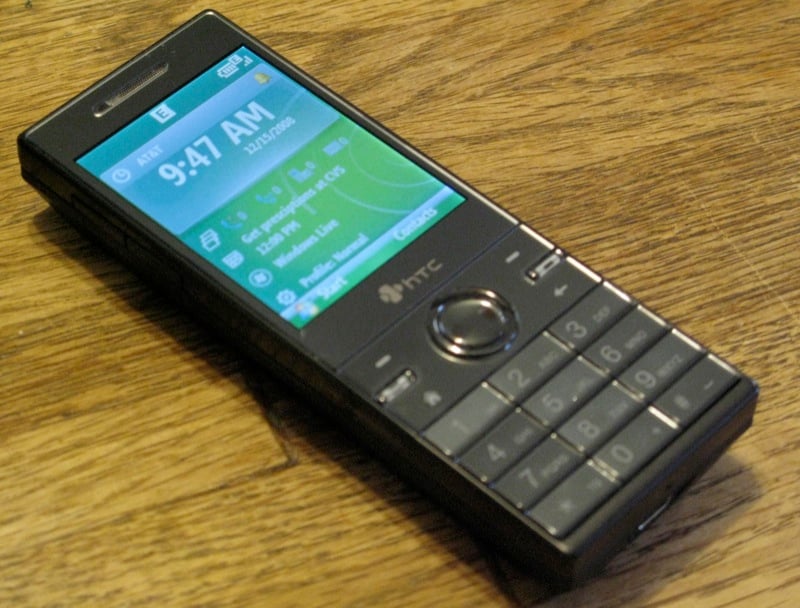
[This is a joint review between Doug Goldring of JAMM and Judie Lipsett of Gear Diary; it will appear simultaneously on both sites. Doug's comments are in black, and Judie's are blue italics]
The last time I used a non-touch screen version of Windows Mobile was the Motorola Q. It ran Windows Mobile 5, and I quickly learned that the interface was nothing short of terrible. That phone lasted about a week before I declared the phone completely unusable and gave it away to a friend. That was then. This is now: Windows Mobile 6.1. And a lot has changed.
I’ve been using the operating system formerly known as Smartphone for years, starting with the HTC Tornado (I-Mate SP5m) in 2005. That was followed by the Motorola Q, the HTC STR TRK, the HTC 710 (Vox), the Samsung Blackjack, the Motorola Q9, the Samsung SGH-i620 , the Samsung Blackjack II, the Treo 500v, the HTC S740 – AKA Rose, and more recently the Pantech Matrix Pro.
I have never felt that even the earliest Smartphone interface was terrible, in fact I generally found Smartphone to be a rock solid OS when compared to Pocket PC, as it required far fewer restarts. Over the years I have enjoyed watching the Smartphone (now called Standard) platform mature. With that said, I think that your bad experience with Smartphone was due to the Motorola Q being such a dog.
So, right off the bat, you can see that Judie and I are coming at this from completely different perspectives. Anyway, I decided the time had come to give a non-touch screen device another try. And what better device to check out than the HTC S740?
I agree that for anyone unsure of whether a non-touch Windows Mobile phone would work for them, the S740 is a great place to start.
Let’s take a look.
Posted by Judie Lipsett in Diary Entries
Update: The winner of the AT&T Pantech Matrix Pro is breley. We appreciate everyone who entered, and we would like to remind you that there are many more opportunities to win coming up on Gear Diary!
Here’s your chance to win an AT&T Pantech Matrix Pro. We are purposely making it easy, so let’s see those entries!
To enter, you need to do the following BEFORE MIDNIGHT CST on May 08…
*Join Twitter
*Sign in
*Follow user GearDiarySite
*Tweet the text inside these brackets:
[I'm entered to win a Pantech Matrix Pro from @GearDiarySite! http://tinyurl.com/d6hq6p]
*Leave a comment to this post with a direct link to your tweet.
This giveaway is only available to entrants in the United States; writers for Gear Diary are ineligible for Gear Diary’s portion of the contest.
We will then select the winner at random from the comments, announcing the winner on the May 09.
This isn’t your only chance to win, but time is getting short – six more sites are after us, then the contests are OVER!
Tools for Thought (15-Apr 19-Apr)
ChipChick (16-Apr 20-Apr)
VivirLatino (17-Apr 21-Apr)
slashgear.com (18-Apr 22-Apr)
www.modaco.com (19-Apr 23-Apr)
Gadgetell (20-Apr 24-Apr)
GeeksRoom (21-Apr 25-Apr)
OSNN (22-Apr 26-Apr)
Techmamas (23-Apr 27-Apr)
Clintonfitch (24-Apr 28-Apr)
Justanothermobilemonday (25-Apr 29-Apr)
Geek.com (26-Apr 30-Apr)
MediaBlab (27-Apr 01-May)
Smartphonethoughts (28-Apr 02-May)
Mobilityminded (29-Apr 03-May)
The Gadgeteer (30-Apr 04-May)
Geekzone (01-May 05-May)
Techie Diva (02-May 06-May)
Bostonpocketpc (03-May 07-May)
GearDiary (04-May 08-May)
MobilitySite (05-May 09-May)
AbsoluteWindows (06-May 10-May)
Mobilejaw (07-May 11-May)
Experiencemobility (08-May 12-May)
HackCollege (09-May 13-May)
Gear Live (10-May 14-May)