Posted by Dan Cohen in Diary Entries
Let’s face it, the idea of being able to wear special glasses that turn an iPhone or iPod screen into a large-screen tv is awesome. There are a number available from companies like Vizux and Myvu. The problem is… they really look dorky.
Seriously how scary is THIS???

Well, finally there is a pair of video-glasses that actually look good.

The just-announced Vizux 310 Widescreen Video Eyewear look slick, create an image equivalent to watching a 55 inch screen and work for up to 6 hours on two AA batteries. They will be available later fall for an MSRP of $249.5.
The full release follows…
Posted by Jason Reese in Diary Entries

Need an easy way to lock partitions your hard drive so others using your PC (like the kids) don’t go in and delete all of your cherished photos, your music library, or just flat out crash the computer? Want to painlessly restore your PC when your buddy “accidentally” visits a site full of nasty viruses and malware? USB Fever’s Windows IceBox aims to make it just a bit easier for you in a convenient USB dongle.
Just plug in the Windows IceBox to an available USB port and software is automatically launched to let you customize exactly what you want to protect — or freeze. If something is lost or if you find your computer plagued with malware, just reboot the computer and plug in the USB dongle — you’ll be able to easily restore back to the computer’s previous working, problem-free state. At under $20, the Windows IceBox USB dongle looks like it would be a great gift for for someone who just needs an easy way to keep their computer problem free (without relying on you for tech support
).
USB Fever – Windows IceBox (Freezer) – $18.99
Posted by Dan Cohen in Diary Entries

One of the things I have come to enjoy about Apple announcing new products is is that it also means my favorite accessory companies often release new cases, cradles and more. Wouldn’t you know that is just what’s happening now that there is a new Nano in the world!
iLuv has just announced a new line of graphic color cases for the 5th Generation Nano and 2nd 3rd iPod touch.
The cases range in price fomr $14.99 to $24.99 and if they are anything like the iLuv cases I have reviewed in the past they will both look good and do a nice job of protecting your device.
Images and details follow…
Posted by Larry Greenberg in Diary Entries

As Apple releases software upgrades for the iPhone OS jailbreakers are forced to wait for the jailbreak solution of their choice to be updated to work. Such is the case with Apple’s most recent 3.1 updates.
The first jailbreak solution for the newly released 3.1 software has just become available.
Good news: The iPhone Dev. Team has released it’s much anticipated jailbreak for the 3.1 firmware.
Bad news: It’s available for all devices except the iPhone 3GS and iPod Touch 3G.
So if you have an iPhone 1st Generation (2G), The iPhone 3G or the iPod touch 1G and want to re-jailbreak after upgrading to 3.1 or have been waiting to upgrade because you wanted to keep your jailbreak you’re now good to go.
Head to the iPhone Dev Team blog for all the details and the download.
Posted by Larry Greenberg in Diary Entries

Jessica just recently posted a great tutorial on how to get MMS on your iPhone now, before AT&T’s promised September 25th delivery date. If you missed it check it out here.
That got some of us here at Gear Diary started on a small debate about the merit’s of MMS.
I saw the MMS trick a few days ago couldn’t come up with a reason for MMS on my phone so I simply didn’t install it and still haven’t.
For the life of me I can’t understand why everyone is making such a huge deal about MMS. Is it just that AT&T’s failure to deliver it a few months ago was something to complain about? Or is there actually something essential on a device that already has email? Could someone please explain to me what MMS brings to the table…
Maybe I’m in the minority but most of my friends & family, which are the people I’m most often sharing pictures with, have access to either a smartphone (Blackberry, iPhone etc.) or more importantly an e-mail account. So if i want to share a picture with them all I have to do is e-mail it knowing they’ll see it either on their phone’s e-mail client or on their computer.
I know MMS is still very popular outside the U.S. but we’re strictly talking about AT&T here in this case.
So are you eagerly awaiting the arrival of MMS on the iPhone, or have you already done the trick Jessica posted about? And if so what do you actually use MMS for that makes it such a compelling feature?
Posted by Michael Anderson in Reviews

My distinct memories of getting an air hockey table back during the 70’s fad era certainly places me in time, but I do still have a certain fondness for the game that I share with my family from time to time. Our kids got one of those multi-game tables with a small air-hockey board included. So when I heard about Arcade Hockey coming to the iTunes App Store I was thrilled … but the obvious question remains – how does the table game translate to the small screen?
Posted by Dan Cohen in Reviews

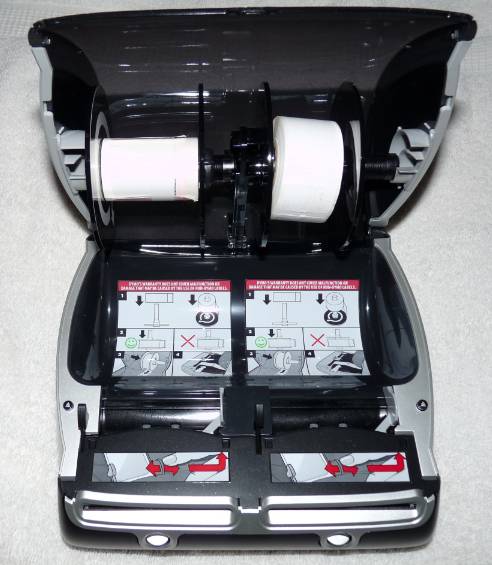
If you have to send large numbers of snail-mail, a dedicated label printer may be just the thing for you. If you want speed and flexibility in your label printer, then the Dymo 450 Twin Turbo is definitely worth a look.
While having a dedicated label printer with two different bays that hold two different sizes and types of labels may sound like overkill, it isn’t. In fact, it makes life even simpler by allowing a degree of flexibility that can save the time of switching from one type of label to another. For example, one side can have address labels while the other can print stamps.
Here’s a quick look…
Posted by Christopher Gavula in Reviews
The Internet is proving to be an interesting outlet for traditional, commercial radio. Many programs like iTunes, offer streams from various radio stations.
WunderRadio is from the Weather Underground folk, and it brings you literally thousands of radio stations and streams from around the world. Let’s take a closer look!
Posted by Jason Reese in Diary Entries

Talk about taking your time…
Let’s see, back in March we found out that RIM was sponsoring U2’s latest tour. In July, RIM began hyping a mobile album and application that would be coming out for BlackBerry users. Then, the waiting began.
A lot of people thought that when U2 kicked off their North American Tour on September 12th something cool exciting mildly interesting would happen with the BlackBerry/u2 joint venture. No such luck.
Instead of a big announcement. No no Blackberry commercial featuring the band. At least not so far. (Given the speed lack of speed with which things are being rolled out perhaps there is one pending for next year month),
Nope, all we got is an app… if you can find it. To get it you have to go into BlackBerry App World and search for the application. Good news is once you find it it’s free. (That assumes you are in a country that has access to BlackBerry App World since our poor friends in Australia still don’t.)
The application itself is pretty well put together. So long as you don’t mind waiting for songs and video clips to download you get some nice animated transitions and a user interface that doesn’t look like it was pulled from 1984. So, what exactly does this U2 app do, you ask?
Posted by Jason Reese in Diary Entries

Some of the biggest challenges with technology and the gear we decide to regularly use is what problem(s) does it solve? Will it improve my efficiency? Is it cost effective? Take the challenge of wireless printing, backing up data from multiple computers, and then sharing that data across your network.
This used to require separate pieces of equipment and the frustration time to manually configure each separate item on your network. As is usually the case with new products, convergence is the name of the game (and Gear Diary loves convergence!). Let’s take a look at the new Belkin Home Base, which aims to let anyone with an existing wireless network easily print, backup files, and share their data to anyone on their network.
Posted by Dan Cohen in Diary Entries

Since reviewing the Epson WorkForce 600 last year it has been my work horse in my home study. We have other printers (most came bundled with computers we bought) but the WorkForce 60 is the printer I use.
Today Epson announced a new, mid-range photo scanner, the V600. The V600
offers advanced performance for photos, film, slides, and everyday documents. Delivering higher resolution and expanded versatility compared to competitive flatbed scanners in its class, the scanner features 6400 x 9600 dpi resolution and 3.4 Dmax for creating high-quality enlargements up to 17” x 22”. It also includes powerful photo restoration tools for both film and prints to bring faded and damaged photos back to life, as well as productivity enhancing Epson ReadyScan LED technology.
The V600 Photo will be available in mid-October for $249.99. The full release follows…
Posted by Wayne Schulz in Deals

This Acer Aspire One with 11.6″ screen, 1GB RAM, 160 GB Hard Drive, 802.11G Wi-Fi and Windows XP Home SP3 is a relative bargain for $280 shipped from J&R. I use a slightly smaller version of this computer and while I wish the keyboard was backlit you can’t beat the small size for carrying this on a plane or throwing into a briefcase during daily travel. I’ve used my Netbook to connect into client sites via Remote Desktop without a hitch. What it lacks in processing horsepower it makes up for in far superior battery power and convenience.
Posted by Dan Cohen in Diary Entries

I reviewed the SoundID 300 back in April and LOVED it. It is sleek looking, super comfortable and, most importantly, sounds fantastic! It happens to be the headset I use most on a day to day basis.
SoundID will soon be releasing the SoundIS 400; it is the update to the 300, and it looks to take a great headset and make it even better.
The most significant improvement seems to be the new “Environmental Mode”, a new functionality that grabs sound around you and passes it through to your ear between calls. This means you don’t have to remove the headset between calls in order to listen with both ears. That is a great feature considering the headset is comfortable enough to wear all day.
At an MSRP of $129.99 the SoundID 400 is the high end of the market, but for the degree of comfort and sound quality it offers it promises to be well worth the price.
Full Release Follows.
Posted by Jessica Fritsche in Diary Entries
So, yesterday in my daily perusal of the web, I saw that AT&T had started silently rolling out MMS functionality for the iPhone in small batches. It didn’t seem to have a rhyme or reason–some people on iPhone OS 3.0 had it, some on 3.01, and some on 3.1, all in different locations.
Some people in the Dallas-Fort Worth area were reporting working MMS, so the question at the forefront of my mind was HOW DO I GET IT!? I’m an impatient girl, and I didn’t want to wait another 11 days for MMS on my iPhone if I could get it now! A little more Googling and a few visits to the HowardForums gave me the answers I needed. How can YOU get MMS working on your iPhone? Well, I’ll show you.
Posted by Thomas R. Hall in Diary Entries

Remember the Milk, the popular online Todo list manager, is well-known for not just for having an intuitive web-based interface, but also for their wide array of ways to access your data. Add another one to the list. Today, a new native Android client was released.