Do TONS more with your Magic Mouse

Posted on 27 December 2009 by Larry Greenberg


There’s no denying the “cool” factor of Apple’s Magic Mouse.  The sleek top, which allows for not only clicking but also swiping and pinching is a tremendous update to its previous version, the Mighty Mouse.

But if you need even more out of your Magic Mouse, well then I’ve got the application for you.

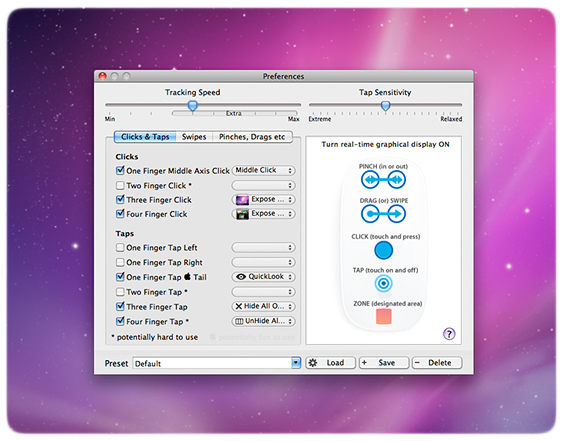
Magic Prefs is an add on for your Magic Mouse, which allows for a staggering amount of configurable add-ons.  “It features the ability to bind a variable number of finger clicks, taps, swipes, pinch and other gestures to functions like Middle Click , Hold Down Both Mouse Buttons , Spaces , Expose, Dashboard etc.”

The application also features a real-time display of your fingers touching the surface of the mouse so that you can enable it and test and monitor the way the mouse sees your input.  This comes in handy when you enable many of the application’s features at the same time.

Dan and I have both tried it out and while some of the add-ons take a little getting used to it’s certainly a welcome addition.

Download Magic Prefs for free here.

Related Posts with Thumbnails

This post was written by:

Larry Greenberg - who has written 664 posts on Gear Diary.

I have always had a passion for gear and gadgets. It all started for me with the release of the very first Palm Pilot. I've always had an interest in handheld electronics. From handheld PDAs, to cell phones, Mp3 players, watches and other products, I'm the first person my friends, family and colleagues call when they need advice on tech. I have roots in the online tech. forum community. I served as the Administrator to Howard Forums.com and as a Moderator at both Treo Central.com and Blackberry Forums.net. Under the screen name “lgreenberg” I've amassed 50,000+ postings. I also manage my own YouTube channel under the user name larrygreenberg. I'm always eager to help.

Contact the author


8 Responses to “Do TONS more with your Magic Mouse”


Leave a Reply

You must be logged in to post a comment.


Join the Gear Diary Community at MyBloglog!