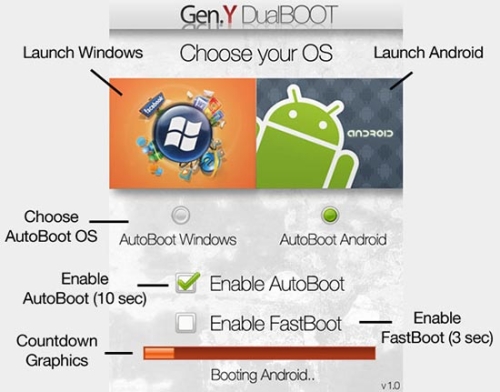
Image Courtesy of PocketNow
Tired of your WinMo OS or want to give Android a try? Pocketnow has a nice video of a simple linux bootloader that allows you to choose between Android or WinMo as a bootup option on your Windows Mobile phone. I don’t know what phones this is compatible with, but I’m gonna assume you can use any phone that has an Android Rom ported for it, or maybe just try out a vanilla Android Rom on your device.
See it in action after the break.
http://www.youtube.com/watch?feature=player_embedded&v=Nvj4ObHmxCI
Ultimately I hope to see a working Android Rom for the HTC HD2. The US model will be available in a month or so and has the updated US specs to run the next version of Window Mobile. That could be a deal sealer for me to have the new 7 option or Android. More info and instructions at Pocketnow and XDA. As always, try at your own risk. In this case, its made real easy for you. Let us know if you successfully dualboot on your Window Phone.