Posted by Larry Greenberg in Diary Entries
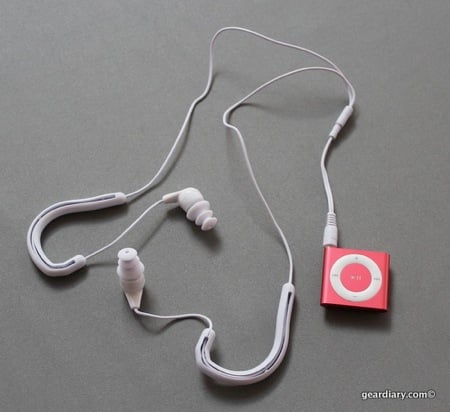
Tired of poor fitting ear buds that are always failing out of your ears?
Yurbuds, makers soft rubber tip earbud enhancers that slip over existing earbud-style headphones, now has an iPhone App which is meant to help with this annoyance.
“Size yur Ear!” for the iPhone allows consumers to easily submit photos of their ear and purchase custom-sized earbuds directly from an iPhone or iPod touch. The Yurbuds earbud enhancers, when sized using the “Size yur Ear!” iPhone App, are guaranteed not to fall out, remain comfortable for hours and deliver exceptional sound quality.
The application also offers a video tutorial that teaches users how to use the application to ensure the proper custom fit is achieved. It all seems quite simple. All you do is launch the application, take a picture of your ear and hit submit and purchase. Your Yurbuds ship the very next day.
The iPhone application is powered by yurbud’s patent-pending yurScan technology to determine a person’s yurbuds size via the camera feature of the iPhone application. Yurbuds worked closely with top audiologists and Metaphase Design Group to develop an earbud enhancer that locks gently in the ear while avoiding known pain points.
The App is available for free in the iTunes App Store here and the Yurbuds sell for $19.99 here.
Posted by Larry Greenberg in Diary Entries
I get the question asked of me quite often.
It usually goes something like this.
“Larry, can I jailbreak my iPhone?”
To which I reply “well that depends.”
That enters us in to a discussion on the software and base band running on the person’s phone, the different methods used to jailbreak and so forth.
Today I stumbled upon a really nice web site which should assist not only me but anyone wondering if they can jailbreak their iPhone.
Jailbreakmatrix.com contains a chart with all of the hardware and software versions of the iPhone and what’s required to do so. It even links each software/hardware version to the instructions and downloads needed to begin the jalbreaking process. The chart is neatly organized and easy to navigate.
The site is sort of a work in progress and its creator promises to make changes as needed but for now it’s a nice resource for those confused as to what their phone can do.
Check it out here.
Posted by Joel McLaughlin in Reviews
Larry previously reviewed Gelaskins and we’ve recently posted about their release of National Geographic Gelaskins. Â However, just this week Gelaskins has gotten a lot more super! Â Marvel characters like Spider-Man, Iron Man, the X-Men, Wolverine, the Hulk, the Fantastic Four, Captain America, Daredevil, the Punisher, Ghost Rider, Doctor Strange and others are now available in various forms direct from Gelaskins.
The company was kind enough to send me two of the Iron Man skins for netbooks and I decide to apply the skins showcasing Iron Man and War Machine. Â The skins went onto my netbook in a flash and looks great! Â Any air bubbles were easily pushed out and if I decide I want a different Gelaskin at a later date, it will peel right off and it leaves no residue.
Posted by Larry Greenberg in Reviews
There are plenty of choices when it comes to screen and body protection for your electronic devices and I think I’ve tried them all. Clear Coat might just be the best of the bunch.
What is Clear Coat? Here’s how the company describes it.
Simply put, Clear-Coat is the only protection you’ll need for your devices. Forget those awkward, ugly cases! Clear-Coat keeps your device scratch-free without adding bulk or changing the look of your device. Clear-Coat is meticulously designed in-house, and then custom cut for every device. So an iPhone Clear-Coat fits the iPhone perfectly, and a Blackberry Clear-Coat fits the Blackberry perfectly. We design Clear-Coat to fit over almost every part of the device – so you get protection everywhere – on the screen, sides, front, and back!
How thin is Clear-Coat? Less than 1/100th of an inch, that’s how thin! Most people can’t even notice it on their device, and it will not interfere with docks, cases, or accessories – it’s like it isn’t even there!
I recently spent some time with Clear Coat and walked away very impressed. Their shields are the clearest of any I’ve seen and they do not suffer from what’s commonly referred to as the “Orange Peel” effect. The shape of the shields, which mirrors the natural contour of your device, makes installation a snap.
Posted by Dan Cohen in Diary Entries
I have a 7am flight to Florida tomorrow morning. That means I have to be at the airport by 5:45am. That means I have to leave my house by 5am. That means I need to get up at 4am. And THAT means I am a bit worried about oversleeping and missing my flight. To help avoid that I will be setting five different alarms and putting them in various locations to help ensure I don’t hit the snooze button and oversleep.
I really wish I had one of iLuv’s new iMM178 Vibe Plus vibrating iPod/iPhone dock/alarm clock’s and its “Shake and Awake” alarm clock feature since it would let me feel far more confident that I won’t miss my flight. This is an update of the iMM153 which Michael posted about last June, and which did not list support for the iPhone; a touch was shown in the dock, which at first glance probably confused many hopeful iPhone owners. It’s a shame that the ability to work with an iPhone added $40 to the MSRP, however.
The $99.99 unit features
…a sleek and slim black body design with a bed shaker that includes a speaker and volume control. iPhone and iPod users now have ten ways to wake up to their favorite music and this dock provides a 7 day – 5 day – 2 day alarm option for waking at a set time everyday, weekdays only or weekends.
The Vibe Plus is now available and is a great solution for any of you chronically late, “I love the snooze button” over-sleepers.
Posted by Larry Greenberg in Diary Entries
Jason gave us the once over on Poynt for Blackberry back in December and now the nifty local search application is hitting the iTunes App Store too. The key to the iPhone version is the use of augmented reality technology, giving the user a real-time view of businesses, people, retailers and theaters around them.
Here’s how the developer describes the application:
Poynt is a convenient and time-saving application that connects iPhone users to local businesses, people, restaurants and movie theaters wherever and whenever the information is needed. Poynt for iPhone offers the features and benefits of multiple individual applications and the thorough integration with on-board apps like the address book, maps and phone makes the app truly more than the sum of its parts. By entering search terms, the user is able to discover people, businesses, restaurants and movies near their location. Poynt allows users to find phone numbers and addresses, maps and directions and offers enhanced features such as the ability to read movie reviews, view trailers and even purchase movie tickets and book dining reservations.
“With over two million Poynt users already on the BlackBerry platform worldwide, the market demand to bring Poynt to iPhone has been overwhelming,” said Andrew Osis, CEO of Multiplied Media. “We are very pleased to be able to now provide both iPhone and BlackBerry users the best in mobile local search. After months of development, our application for the iPhone is ground-breaking in its use of augmented reality technology and local search abilities, while still remaining true to the Poynt brand.”
Poynt for iPhone includes rich features such as:
-Â Â Â Setting a Location: Poynt will detect your current location to begin a search or you can manually enter an address to use as your search location
-Â Â Â Map View: Rotate the device to map a single or full set of search results
-Â Â Â Augmented Reality: From within the map view, users can access a directional view of search results
-Â Â Â Call Gesture: From a search result, hold the phone to your ear to automatically place a call
-Â Â Â Address Book Integration: Add frequently accessed listings to your Contacts for convenient future look ups.
Poynt is free and available in the iTunes App Store now.
Look for a full review of the iPhone version soon.
Posted by Larry Greenberg in Diary Entries
I have fond memories of summers living in Chicago.  On my days off I’d take the train over to Comiskey Park on the South Side of the city and purchase a single game ticket to see the White Sox play. I wasn’t even a fan of the Sox but a fan of the game.
Purchasing a single game ticket usually meant I was able to secure one of the best seats in the stadium, usually right behind home plate, just a couple of rows off the field.
I always brought my Palm Pilot along and it was loaded with baseball score keeping software. I enjoyed looking back on those games seeing how the managers made moves and the strategy involved thinking about what I might have done differently if I were in charge.
Fantasy Baseball is uber-popular but it takes a lot of dedication and also relies on others. Thanks to Fizz Software you can now manage your own baseball team from the comfort of your sofa and enjoy a entire Major League season on your own. You don’t even have to convince your wife to let you attend your league “draft” which she knows is just an excuse to go drink beer with your buddies.
Their Baseball Manager 2010 application for the iPhone OS, which is now available in the iTunes App Store, put you in the managerial role of a big league club for an entire major league season.
You take control of your favorite baseball team and guide them through spring training, the regular season into the post season and hopefully all the way to the World Series. You control everything from player trading and contract negotiations to choosing the starting lineup for each game.
The game is available now for $4.99 by clicking here.
Posted by Larry Greenberg in Diary Entries
Do you lack balance in your life?
New Balance has announced the launch of New Balance 365, a collection of 365 short films that engages consumers 365 days a year by asking them to think about “the balance”.
Beginning on February 22, one 20 second short film that creatively explores the idea of “the balance” will post live each morning to NewBalance365.com for consumers to view, ponder and engage with the New Balance brand each and every day of 2010.
In an effort to extend the creative reach of the project, each film will also be available as an free iPhone alarm clock application. Through interesting film and sound, the New Balance alarm clock wakes you up with something new and different every day and provides the user with a daily dose of “balance”. The app will also allow users to view their own sleep statistic and how they compare to others around the world.
The short videos are cute and fun and if nothing you’ll probably leave with a smile after watching them. It’s one of the first collaborations that I know of that combines advertising with a new web site and an application for the iPhone.
Check out the teaser video below and then head to the site to start watching.
The iPhone application is available for free here.
[youtube]http://www.youtube.com/watch?v=uObmaDFLGbI[/youtube]
Posted by Dan Cohen in Diary Entries
Watching the roll-out of the new MusicSkins’ Beatles collection was fun. Giving away some of the skins we got was even more fun. So who gets to have the greatest band ever protecting their “i-device” thanks to Gear Diary?
Read on…
Posted by Dan Cohen in Diary Entries
When Larry and I were at CES we attended the rollout of MusicSkins’ Beatles collection. While the music of the greatest band ever can’t be IN your iPhone or iPod yet (at least via iTunes) it can now be ON your device. In fact, both my iPhone…
are currently sporting the new skins.
Well, we have a few to give away today. It is going to be a quick one so read on to find out what is up for grabs and how to win…
Posted by Larry Greenberg in Diary Entries
One of the most popular games to hit the iTunes App Store was “Brothers in Arms”. The “Call of Duty” like game which places the player in the middle of World War 2 is still one of Gameloft’s most successful titles for the iPhone OS.
The much anticipated sequel to the game, Brother In Arms 2:Â Global Front, just hit the App Store today.
I quickly downloaded the game and recorded this brief video walk though of the first few minutes.
Unlike the first version which actually showed the player’s body while playing the sequel is a more traditional first person shooter where you see only your weapon. The game’s graphics have been improved and load times are much faster than the first version.
Unlike Brothers in Arms, which took place on the European battlefields of WWII, the sequel carries you into the Pacific realm of the conflict.
The game is available in the iTunes App Store for $7.99 by clicking here.
Posted by Dan Cohen in Diary Entries
So what do you do with an old, beat-up iPod classic? That’s the question that faced me when my brother-in-law recently gave me his old iPod classic after he picked up a new one. (Note: the iPod pictured here is not the actual iPod. His was bad but not THIS bad.)
It turns out that the iPod was crashing constantly and wasn’t holding a charge. I tried formatting and reinstalling the firmware a number of times but to no avail. It stopped crashing but the battery was completely and totally shot. So he went out and bought a new one and left his old one at our house. So what was I to do with it?
I had a few choices. I could throw it out. I could put a new battery into it. Or I could “reclaim” it.
Of course I did the latter.
Posted by Larry Greenberg in Reviews
Going green and buying electronics usually don’t mesh very well. Thinksound set out to create great sounding headphones that were also friendly to the environment too. Not an easy task to say the least, but one the company took very seriously.
Thinksound’s lineup currently consists of two eco-friendly headphones. The company was kind enough to send me both to review.
Does being “green” mean you have to sacrifice sound quality?
Click on through to find out, but here’s a hint, in a word, nope….
Posted by Dan Cohen in Diary Entries
The iPhone has been great for the aftermarket battery business. I don’t know any power-user who does not carry at least one additional method of charging the device. I’ve tried, and been impressed by many. Most recently PhoneSuit sent me one of their Primo Micro Batteries to try out. The last product from PhoneSuit that I had the chance to review was the Mili. It had a design similar to the original Mophie Juice Pack. I liked it a lot and got a good bit of use out of it before giving it to a friend.
The Primo takes a different approach. It is your more traditional “clip on the bottom via the dock connector” battery. That means it is great for use with my iPod touch as well as my iPhone. The thing is… the battery only offers 800 mAh. As compared to the 2000 mAh of the Mili this thing is small… really really small. Usually the diminutive size would have made it a battery I would take a pass on but, in fact, I’ve taken to keeping it in my bag.
Let’s take a look…
Posted by Dan Cohen in Diary Entries
While 2010 is already shaping up to be the “Year of the Tablet” let’s hope it can earn another moniker– “The Year Of The Solar Charger”. With so many devices all drawing power to charge their batteries it is time for solar charging to go mainstream. To help that process along Scosche has just introduced the new SOLBAT2. The SOLBAT2 is “provides a convenient and environmentally friendly way to charge your USB powered device”. It offers 1500mA of power and lets you use your existing USB cables for a wide range of devices including iPod, iPhone and Blackberry. It ships with a USB charging cable for those times when you need to juice it up quickly.
The SOLBAT2 has an MSRP of $29.99 and is available now.
More images follow…