Posted by Jason Reese in Diary Entries

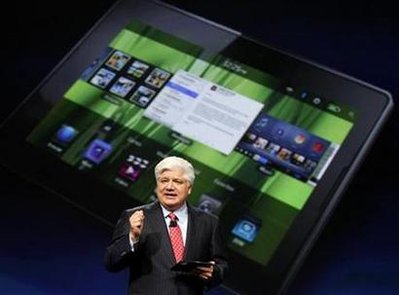
RIM is hosting their second annual BlackBerry Developer Conference next week, November 9th-12th in San Francisco, CA. This event will, in many respects, be critical for RIM and the BlackBerry platform. It was not that long ago that RIM’s devices were merely simple mobitex pagers that had business users excited at the prospect of seeing Ds and Rs next to messages that were delivered & read between colleagues.
The BlackBerry lineup of devices have since matured to be the corporate user’s primary messaging machine, and handily infiltrated the consumer space with Pearls, Curves, Bolds and Storms. RIM is now hoping to attract more developers to their platform and increase market share in an already competitive arena where the iPhone, Android, Windows Mobile and webOS continue to sway both consumer and corporate users.
Posted by Jason Reese in Deals

One of the things I absolutely love to do with a mobile device is customize it to meet my needs. As many BlackBerry users know, one of the simplest ways to begin to customize a ‘Berry UI is to use themes. Back in September, Dan did a great job covering BlackBerry themes when he was setting up his new Bold — and last month Wayne showed off a beautiful HTC Hero BlackBerry theme he was using for his device.
Honestly, it is extremely rare that I find a theme that creates any excitement for me — or one that I would take the time to post here on Gear Diary. This week, that changed. I saw an update a few days ago from a BlackBerry guru who goes by the handle “N8D” (if you’re not familiar with N8D, I highly recommend you take a few minutes to view some of his BlackBerry videos — including device disassembly instructions and a very thorough BlackBerry model comparison). So, when N8D commented that the Transitions theme for BlackBerry was “the best theme made for BB E.V.E.R.” I quickly took note. What I found was that it is not only an awesome premium theme for BlackBerry devices, but it may also be the very best theme you can get for a very low price. Interested? Let’s take a closer look and see it in action …
Posted by Jason Reese in Diary Entries

Everybody’s got an app store these days. So guess what? Now we have an app for that, too buddy! Announcing the Gear Diary on-device app store for BlackBerry devices! It’s free, and easily installs right on your ‘Berry. Simply install the application on your BlackBerry and you can browse, search, purchase, and install any application in the store. Read on for full information and a special discount code to save 15% on any application purchase!
Posted by Wayne Schulz in Diary Entries

Attention Android owning basketball lovers — listen to every NBA game live, watch video game recaps, review live scores, get real-time team and player stats and more. This is all available with the $9.99 NBA Gametime 2009-2010 application for Android available for download now. Compatible with T-Mobile myTouch 3G (OS 1.5+), T-Mobile G1 (OS 1.5+). Versions are also available for iPhone and BlackBerry in their respective application stores. This is the perfect application for watching sports while you’re supposed to be doing boring stuff like working.
Posted by Dan Cohen in Reviews

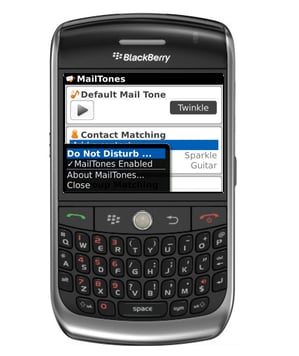
I reviewed Mailtones for the iPhone a few weeks back and really like it. The app allows you to assign different sounds to various contacts so that you know who has emailed without even looking at your phone. Now every time Judie emails my phone cheers. Every time Larry emails a fire alarm goes off. And every time my assistant emails there is the sound of impending doom. I love it!
Now Mailtones has rolled out a version for the Blackberry. What do I think??
I LIKE!!
Posted by Jason Reese in Diary Entries

DataViz has updated their popular Documents To Go software for BlackBerry users. Not only can you view, edit, and create Microsoft Word, Excel and PowerPoint files, now you can keep the files synced between your computer and BlackBerry. In addition to bi-directional file synchronization, the new version also includes support for password-protected Microsoft® Office 2007 files, an updated PDF To Go® file viewer, and a new file browser for accessing and managing documents.
Pricing and Full Press Release after the jump.
Posted by Wayne Schulz in Diary Entries

BlackBerry Storm users can officially download version 5.0 of their operating system today. New features include improved power/lock button functions, interactive home screen, face detection for dimming screen, popup keys when SurePressing, better cursor and key controls. The download is free and you must cable your monster instead of the typical over the air download.
Posted by Wayne Schulz in Diary Entries

BlackBerry OS 5 is scheduled to arrive with the launch of the Storm 2 on October 28. One of the hot new features of this operating system will be native synchronization of up to 10,000 contacts between your Google account and the BlackBerry OS 5. Sadly the contact synchronization is not real time instead it will synchronize every 4 hours. Two way wireless synchronization requires BlackBerry OS 5. More details on setting it up below.
Posted by Wayne Schulz in Diary Entries

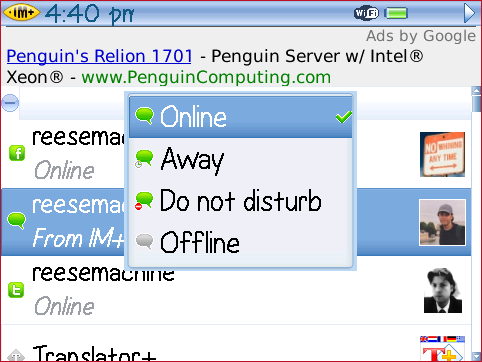
Shape Services just updated their IM+ Instant Messaging Software for BlackBerry devices. New features include a subscription based transcription of spoken messages (awesome), group chat in Skype and the ability to show (or not) your contact’s avatar. We’ve previously reviewed the iPhone version’s transcription feature as well as a version for Windows Mobile. Just like their iPhone version, the transcription service is a monthly fee ($1.99 on BlackBerry vs .99 on iPhone). The transcription works very quickly (less than 3 seconds in most cases) and is incredibly useful for anyone needing to keep two hands on the wheel. For BlackBerry users concerned about battery life (and aren’t we all) you can set IM+ for BlackBerry to run in a push mode which makes you appear online and sends an email notification if anyone attempts to message you.
Posted by Jason Reese in Diary Entries

Want to complain about your BlackBerry browser, or do you want to actually do something about it? Now’s your chance. If you have the skills, it looks like RIM has some openings for WebKit Developers.
Posted by Wayne Schulz in Diary Entries

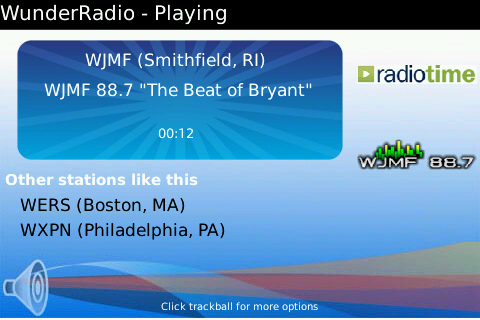
One of my favorite applications for iPhone is Wunder Radio (iTunes / review) . In addition to receiving radio stations both locally and world wide, police scanners, weather radio and more – the iPhone application allows me to listen to Sirius Satellite radio while away from my desktop computer. I’ve been waiting eagerly for Wunder Radio to appear on the BlackBerry and today it’s available in the BlackBerry App World for $9.99. Unfortunately the version that’s available only works on BlackBerry Bold and Curve. A version will be available later for the Tour and Storm. Also regrettably missing from the new BlackBerry version is the ability to listen to Sirius Satellite radio. Continue Reading
Posted by Wayne Schulz in Diary Entries

For many years I had no idea what people found interesting about Podcasts. These recorded audio programs are named for their typical method of distribution through iTunes where they are often downloaded to iPods. A podcast session typically lasts about an hour and features one or more hosts talking about specific news of the week. Topics can range from technology to politics to financial news. The rise in popularity of Podcasts means that their distribution has also spread beyond just iTunes and iPods. I’ve found my BlackBerry Bold to be an exceptional podcast player due to its super loud and clear speaker system. There was always only one thing holding me back from using the BlackBerry to listen to my Podcasts – I had to manually download the podcasts. At least until I downloaded PodTrapper for BlackBerry. Continue Reading
Posted by Jason Reese in Deals

Got the mobile app craze? Need to add to your growing collection of productive cool useful fun apps for your smartphone, but just don’t have the extra greenbacks in your wallet? Don’t worry, Gear Diary is here to help!
Posted by Wayne Schulz in Diary Entries

Research in Motion have updated their popular BlackBerry Messenger application to allow BlackBerry users to instant message each other by way of a unique device identifier known as a PIN number. The new version adds several features such as ability to create an avatar, group messaging, add friends by scanning a bar code, share pictures/videos/voice with multiple contacts. Continue Reading
Posted by Wayne Schulz in Diary Entries

Last night I spotted this awesome HTC Here theme (screenshots) that I purchased and installed on my BlackBerry Bold. It can be used on BlackBerry 85xx, 96xx, 88xx, 9000, 95xx, 8900 devices running OS 4.6+. The changes are nothing short of remarkable with the theme copying heavily from the design of the popular HTC Hero’s Sense UI. Your BlackBerry desktop displays a retro flip clock and weather icon (weather icon provided by the free BlackBerry Weatherbug application). Installation is done entirely over the air and except for a couple tricks (pull the battery, double click the main screen menu button twice to refresh) the installation was a snap. The downside? Cost is $6.99 and the theme requires me to manually start up both the home screen and the weather application after rebooting. For some this $6.99 is crazy expensive – for others like me who enjoy having weather and time displayed prominently on the BlackBerry – it’s money well spent.