Tag Archive | "Google Gmail"

Gmail Issues Today

gmail_logo_stylized

Gmail is once again having some issues. When I woke up, I noticed that all of my new e-mails were indicating that they’d already been read when I checked from my iPhone. The problem was, I haven’t read any of them yet. I e-mailed Larry to ask if Gmail was down for him too, and he told me that he’d seen on twitter that exchange was having problems. Since I use exchange with Gmail currently, that clearly was the issue. Looking at my iMac, everything seemed to be fine. A few hours later and it still isn’t working properly. I checked in with Larry, and he indicated that his most recent e-mail on the iPhone was from 8:27 a. m. when in fact it was now 11:15 a. m.. His iMac, on the other hand, showed all of the new e-mails. Yes, it’s just another day in Gmail land.

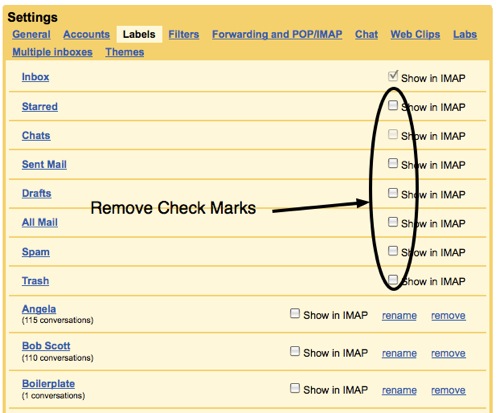
Fortunately there is a bit of a workaround. If you’re currently using exchange on your iPhone to access your Gmail account … don’t. Turn off the exchange e-mail, and go into the e-mail setup wizard and create a Gmail account. Preferably use IMAP in order to set it up, so that whatever you do on your iPhone will be reflected on the server. Once you’re done setting up the IMAP account, make sure that the e-mail exchange account is off and the new IMAP account is on, and you should be good to go. No you won’t have push e-mail, but at least you be getting your e-mail.

Later on, when Gmail exchange is working again, you can just swap back. But don’t delete that IMAP account; it will likely come in handy again, soon.

Comments (0)


Tags: , , ,

Android Users – Back Up Your SMS Messages to Gmail

sms_backup_android_main

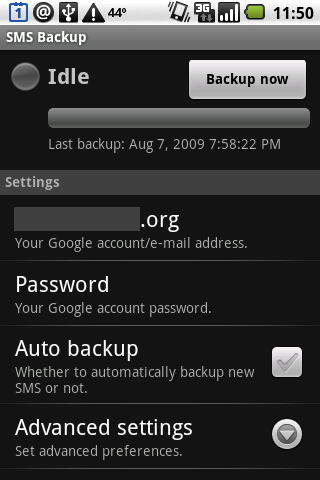
In talking with people that send text messages (SMS), one of the most frequent things I hear is that they wish they could save some of their SMS messages. Many of them have lost their messages forever if their phone is damaged/replaced/upgraded, or they run out of room and are forced to delete them. There is a very useful application for Android called SMS Backup that helps you save your SMS messages to Gmail so you can keep them forever.

Continue Reading

Comments (0)


Tags: , , , ,

IBM does battle with Google over email costs

lotuslive inotes .jpg

Who would’ve thought we’d see IBM positioned as a low cost alternative technology provider. That’s exactly what they appear to be doing — at least on the surface. IBM’s LotusLive iNotes web mail service is priced at only $36/user per year versus Google’s $50/user per year price for Google Apps Premier Edition. Unfortunately that just might be where the positive comparison ends for most companies. Unlike Google, which provides 25 GB of storage, IBM only offers up 1 GB of email storage (you can buy added storage for an extra annual fee). They also lack the word processing, spreadsheet and presentation applications that Google includes in their Google Apps bundle. Of course for anyone deeply embedded in Lotus Notes this is probably a wise investment as the service claims integration with your existing on-premise software. Naturally IBM also touts tighter security and a whole host of other corporate type benefits.

LotusLive iNotes via Physorg.com

Comments (0)


Tags: , ,

Push Gmail arrives on iPhone via Google Sync (finally)

google sync.jpg

Google has just rolled out push email for the iPhone via Google Sync. Earlier this year they’d launched Google Sync which allowed you to synchronize your Gmail Contacts and Google Calendar with your iPhone, Windows Mobile, and S60 devices. Today, they’ve added Gmail support to Google Sync for iPhone, iPod Touch and Windows Mobile devices. To make use of Google Sync, navigate to http://m.google.com/sync for instructions pertaining to your device. If you’re using Google Apps then be sure your administrator enables Google Sync under the Mobile option. As of now there’s no ability to search Gmail email messages but messages that you read on the web are instantly synchronized to your iPhone and items deleted are moved to archive on the web.

Google Mobile Blog

Comments (8)


Tags: , , ,

How to enable, discover, and use Gmail keyboard shortcuts

gmail_settings_keyboard_shortcuts

Gmail has enabled increased productivity for those who large amounts of email due to its unique interface (conversations, labels, to name two!). Not everyone uses keyboard shortcuts, but they can be a big time saver in processing email. Read on to learn more about keyboard shortcuts and how to quickly learn them.

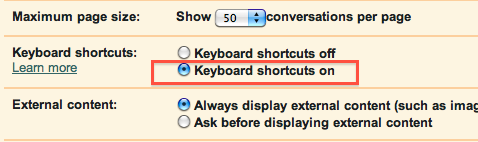
Keyboard shortcuts are very useful because they quickly allow you to navigate your inbox quickly. You can also do things like select many messages at once and archive them, delete them, and even mark them as spam. Keyboard shortcuts are disabled by default. To enable them, simply go into your Gmail settings under the General tab and choose the radio button for Keyboard shortcuts on. Click the Save Changes button at the bottom of the page and go back to your inbox.

Continue Reading

Comments (0)


Tags: , ,

Gmail now able to play Google Voice voicemails directly

gmail_google_voice_voicemail_playback

Google Voice is already a useful system, but Google is now expanding their Google Voice offering by now offering the ability to listen to your Google Voice voicemail directly in Gmail.

Continue Reading

Comments (0)


Tags: , ,

RIM Releases Enhanced Google Mail Plugin for BlackBerry Mail – Adds Most Gmail Features to Native BlackBerry Messaging

bb_enhanced_gmail_message_list

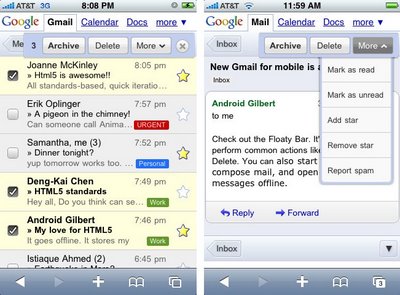
RIM recently released the Enhanced Google Mail Plugin for BlackBerry BIS users. This plugin enables some of the most used Gmail-specific features that the native Mobile Gmail client has, including: Archiving messages, starring and labeling messages, reporting spam, local and remote Gmail searches, and conversation view. The advantage of the new Enhanced Google Mail Plugin is that it enables these features in the native messaging interface, which allows for standard push BlackBerry messaging without having to go into a dedicated application.

Continue Reading

Comments (1)


Tags: , ,

PushMail Brings Push Email Notifications That Really Work

photo

GPush worked great when I first purchased and downloaded it. I write “worked” in the past tense because their servers were apparently not ready for the demand placed on them. After a few hours emails stopped pushing and hasn’t been operable since. Now PushMail is bringing the same functionality… with one major difference… it works!

Continue Reading

Comments (0)


Tags: , ,

GPush for iPhone brings push Gmail – sorta

gpush for iphone geardiary.jpg

I’m going out on a limb and proclaiming it totally crazy that push mail notifications of any type are still news on the iPhone platform. Yet here we are in August 2009 and I’m getting excited that finally there’s an application that provides real time notification when I receive an email in my Gmail account. Never mind that it only works for one Gmail account or that you STILL have to click on your regular mail client to open and view the mail. Maybe by 2010 there will be some fully integrated Gmail push love for the iPhone. Until then grab GPush for .99 and bring half a Gmail push solution to your iPhone.

GPush

Comments (1)


Tags: , , ,

Gmail Drops “On Behalf Of”

Gmail Blog logo

If you take advantage of Gmail’s option to send messages within Gmail using one of your other email addresses in the “from” line, you may be aware that your email is depicted in some email software as being from your Gmail address “on behalf of” your other email address. In the Gmail blog last week, Google announced a new option that eliminates the need to show your Gmail address and the “on behalf of” text.

The option is available if your other email provider supports POP or IMAP access.  To take advantage of this new option, go to the Accounts page under Settings, and click “edit info” from the “Send mail as” section.  From there, choose “Use your other email provider’s SMTP servers” and complete the blanks with your server and password information.

Should your other email provider not have a server that allows you to send outbound messages, you can still use the original method.

Comments (0)


Tags: , ,

HTC Magic Review Part 2

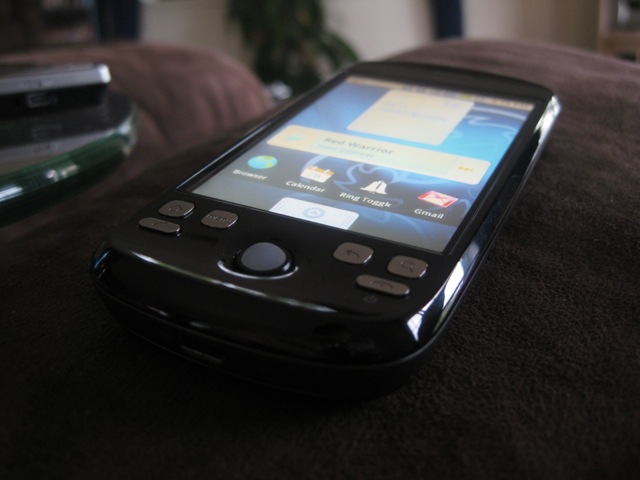
It’s been  a month now since I posted my first impressions, and it’s time to fess up my thoughts on the HTC Magic. Truth be told, it has truly surprised me!

htcmagic-14

User Interface

The Android user interface is simple yet elegant, and was definitely designed with finger actions in mind. Unlike Windows Mobile, Android never makes you wish for a stylus. Icons are nicely sized, menus are large and the flicking motions to advance lists, web pages and menus become second nature as soon as you start using the phone.

For some reason Android feels a lot nicer on the Magic that it did on the Dream, perhaps due to the way the Magic fits perfectly in hand and can be used (for the most part) with either one or two hands.

The one thing that could do with a bit of work out of the box is the icon set, some of them feel a bit childish. The preinstalled theme is up to the carrier though, and replacement themes can be installed easily through the Market to address this.

Continue Reading

Comments (4)


Tags: , , , , , ,

Google Apps Out Of Beta

gnobeta

It seems like it has been around forever yet it has been a mere 5 years since Gmail hit the scene.  Today the Official Google Blog announced that Google Apps have finally been relieved of the Beta tag!

I love Gmail. For me, Gmail hasn’t needed the beta moniker for quite some time. It’s my only mail client for all my personal accounts and makes managing the flood of mail I get on a daily basis so much easier.   I applaud Google for making this milestone even if it took them a while.  Thank you Google!

Comments (0)


Tags: , ,

Gpush offers Gmail push on the iPhone (if approved)

gpush.jpg

My fingers are crossed that this 99 cent application from Tiverias will be approved for the iPhone App Store. The program does little except issue push notifications (Techcrunch say’s they appear within 30 seconds) to let you know you have a new Gmail email message. The lack of push Gmail on the iPhone is one of my biggest pet peeves about the device. Other phones like the Palm Pre and BlackBerry have no problems supporting Gmail push. Let’s hope that Apple approves this application (expected to cost .99) soon so iPhone users can put the lack of Gmail push email behind us.

More

Comments (3)


Tags: , , ,

Why Gmail Rocks (and CSC is trying to Migrate Millions to Microsoft’s Business Productivity Online Suite)

gmail schulz consulting mas90.jpg

This morning I received an auto-response from a subscriber to a newsletter I publish for work. This person is without ANY email for 5 days while they wait for a replacement router that was damaged due to a lighting strike (Connecticut is on about the 30th day of severe late day thunderstorms). How can any business professional be without email for 5 days when clients and customers use email as a replacement for the telephone? Having access to email from any Internet connected computer is an immense benefit — and a reason I’m such a believer in GMAIL and Google Apps which while still subject to outages are in my opinion a much more reliable solution for small businesses than hosting their own email. And apparently others are noticing as well because just this morning CSC announced they expect to migrate millions of users to Microsoft’s Business Productivity Online Suite which is Microsoft’s soon to be available entry into the clouds for Exchange and Sharepoint.

CSC To Resell Microsoft Cloud Services

Comments (1)


Tags: , ,

Gmail Labs: Message translation update

A few days after its release, the new Gmail Labs “Message translation” has been enriched by a new, really helpful, feature.

Now, if you receive a message you will be able to translate it “on the fly”, without having to mess with the Gmail settings.

Once a new mail is received, the space between the message header and body will show two buttons that will allow you to choose the languages of choice.

Here is an Italian message.

gmail-translationtooldevelopment1

Continue Reading

Comments (0)


Tags:
Gear Diary


Click here to follow Gear Diary on Twitter Download the FREE Gear Diary dashboard widget by clicking here Click here to download the FREE Gear Diary iPhone App Click here to get a free 14 day subscription to Gear Diary delivered wirelessly to your Kindle!


    • Click here to keep up with our contests!

    • ProClips for every application

    • Alltop, all the top stories

    • MBA Member