Visit Skooba Design (formerly RoadWired)

Tag Archive | "Keyboards & Mice"

Kensington C170 Keyboard with USB Ports REVIEW

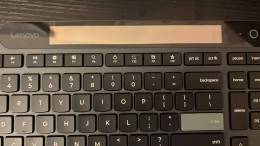
Is it time to replace the keyboard that came with your original desktop? Or perhaps the white keyboard that came with your iMac is so junked up that a black keyboard might be a nice alternative… The Kensington C170 Keyboard with USB Ports is the newest offering from Kensington.

This keyboard features three built-in 2.0 USB ports; one on the back and at the top rear along the back concealed behind a sliding door which also houses a mini-USB connector.

Continue Reading

Comments (3)


Tags: , , , , ,

Click Clack: The Kensington SlimBlade Media Notebook Set REVIEW

I’ve never given much thought to how important using a keyboard is. If one thinks about it, a proper keyboard should have a good tactile feel, minimize wrist and shoulder pain, and have some flexibility with the function keys.

I admit I’m not a touch typist, but I have mastered the hunt and peck style of typing and fully utilize the cut, paste and spell check combinations for successful clickity-clack typing.

kensington Click Clack: The Kensington SlimBlade Media Notebook Set REVIEW

I’ve been using the new Kensington SlimBlade™ Media Notebook Set along with the optional SlimBlade Media Remote. Let’s take a look inside the packaging.

Continue Reading

Comments (0)


Tags: , , , ,

Review: USB Optical Ultra Thin Mouse from USB Fever

Ever wish you had a mouse with you to use in your hotel room with your laptop, but never took one because of the bulk? This may just be the mouse for you.

Measuring in at 1.2 cm or for those of us in the US, 0.4 inches, it’s very thin. Almost too thin.

thinmouse.jpg

Continue Reading

Comments (0)


Tags: , , , ,

The Kensington SlimBlade Bluetooth Trackball Mouse Review

When I wrote about meeting with Kensington at CES, I had already been testing their SlimBlade Trackball Mouse for a few weeks. This is the mouse with a trackball that “gives you control even when there’s no room to move a mouse, then switches to mouse mode with the push of a button.” It’s now been well over a month since I started it exclusively with my Toshiba X205, and I am finally ready to share my experience…

geardiary_kensington_slimblade_trackball_mouse_01

Continue Reading

Comments (1)


Tags: , , , , ,

The Most Awesome Keyboard Ever!

Ever dream of having a customizable keyboard? A keyboard in which you can assign what you want to any key? Well, the day has finally arrived with the introduction of the “Optimus Maximus Keyboard“, from Art Lebedev Studio. What is it? Well, it is a special kind of keyboard that has tiny little OLED screens built into the key caps, yes all the key caps, 113 of them to be exact.

optimax The Most Awesome Keyboard Ever!

Continue Reading

Comments (3)


Tags: , ,

The Logitech Alto Review

I bought a brand new Toshiba Satellite A-105 laptop in late September 2006, and by the time my new Fujitsu T4215 had arrived in mid-January, I had already managed to start wearing the left leg off of the Toshiba keyboard’s silk-screened “A” button. I have no idea what my problem is, but I am really hard on keyboards; I have commented before that I must just bang on the keys or something, because it is common for the regularly used keys to eventually lose their label.

While this might not be a huge issue on the typical desktop keyboard (”Hey, it’s looking pretty worn - time for a new one! Yay!“), it can be a rather costly problem on a not-as-easily-replaced laptop’s keyboard. The best option, for me at least, is to try to hook the laptop up to a separate keyboard. so that I can bang away. This has worked well in the past, more noticeably when the new keyboard was paired with some sort of docking system that also raised the laptop’s screen, added USB ports on the back, and managed to keep the laptop cool at the same time.

While I was still using the Toshiba, I saw an announcement for the upcoming Logitech Alto notebook stand, which would not only raise the laptop screen to a more ergonomic height, it also had the distinction of being the first portable or stationary notebook stand that I could remember ever seeing with a built-in keyboard. Intrigued, I knew I would have to give this thing a try; at the end of January, I received a review sample.

geardiary logitech alto 01

Continue Reading

Comments (4)


Tags: , , , ,

Fabric Bluetooth Keyboard Giveaway!

giveaway_rocky_fabric_keyboard_01_thumb Fabric Bluetooth Keyboard Giveaway!

Since Judie has posted her review, and doesn’t feel that the Fabric Keyboard is for her, she has decided to offer it to Gear Diary readers. All you have to do is answer one simple question and the keyboard is yours!

“What is the famous Star Trek saying that was never actually said on screen?”

Beam Me Up Scotty!

Congratulations Bob Russell!! You were first to comment with the answer, and have won yourself one slightly used (but excellent condition) Fabric Bluetooth Keyboard!!

enterprise-giveaway Fabric Bluetooth Keyboard Giveaway!

Comments (6)


Tags: , , , , , , , ,

Fabric Bluetooth Keyboard Review at pocketnow.com

Our very own Judie has been popping up all over the mobile tech blogosphere, this time over at pocketnow.com with and excellent review of the Fabric Bluetooth Keyboard.

pocketnow_rocky_fabric_keyboard_04_thumb Fabric Bluetooth Keyboard Review at pocketnow.com

Judie liked the concept of a fabric keyboard that could be rolled up to save space when not in use, but for various reasons didn’t find it to be the most comfortable typing experience.

I really like the idea of such a portable keyboard, and in some ways using it beats trying to peck out documents on a tiny thumboard. However, having to have a perfectly flat surface on which to type makes mobile use a bit less practical.

Head on over to pocketnow.com to read the Full Review.

Comments (0)


Tags: , , , , ,

iSkin ProTouch Keyboard Protector Review

With the increasing amount of time that people are spending on their computers these days, be it for work or pleasure, eating and drinking in front of the computer is commonplace. With this comes the risk of spilling that coffee or cup of Diet Coke (Judie :P), or dropping crumbs of that cookie into your keyboard, where they will literally put a spanner in the works.

Enter the iSkin ProTouch, a product designed to help keep all those nasties off and out of your vulnerable keyboard.

CIMG8154

Continue Reading

Comments (6)


Tags: , , ,

The i.Tech Virtual Keyboard (VKB) Review

[Ed. note: this review picks up where the Unboxing left off. If you haven't already read it, read the i.Tech Virtual Keyboard Unboxing first.]

This past month with the i.Tech Bluetooth Virtual Keyboard has been a bit of a roller coaster ride for me. During this time, I have managed to learn way more about Bluetooth Stacks and Windows XP Service Pack 2 upgrades than I ever wanted to know…but I’m getting ahead of myself already, and we wouldn’t want that… ;-)

As many of you will recall from my previously posted unboxing, the Virtual Keyboard (VKB) is a futuristic gadget that uses a red laser to beam a virtual keyboard upon any flat surface. Its body is primarily composed of matte black plastic, and its shiny plastic front is where all of the magic happens. The VKB measures 3.7? tall x 1.4? wide x 1.1? thick , and it weighs 3.1 ounces. On its front is a long black glossy panel which covers the keyboard sensing receiver window. Directly above this area is the red clear plastic covered keyboard projection window.

geardiary_vkb_01

Continue Reading

Comments (10)


Tags: , , , , , , ,
Gear Diary


  • Wireless Keyboard
    Quality long range wireless keyboards at Wireless-Computing.com