Posted by Wayne Schulz in Diary Entries

One of my favorite applications for iPhone is Wunder Radio (iTunes / review) . In addition to receiving radio stations both locally and world wide, police scanners, weather radio and more – the iPhone application allows me to listen to Sirius Satellite radio while away from my desktop computer. I’ve been waiting eagerly for Wunder Radio to appear on the BlackBerry and today it’s available in the BlackBerry App World for $9.99. Unfortunately the version that’s available only works on BlackBerry Bold and Curve. A version will be available later for the Tour and Storm. Also regrettably missing from the new BlackBerry version is the ability to listen to Sirius Satellite radio. Continue Reading
Posted by Wayne Schulz in Diary Entries

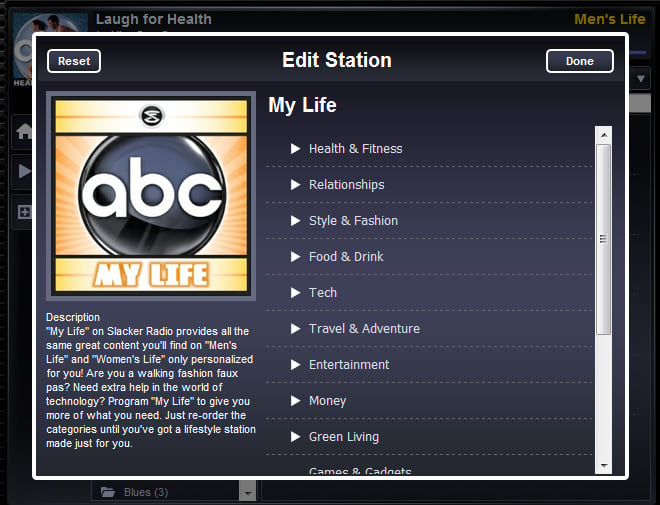
Hard to believe Halloween’s only weeks away. Slacker online radio kicks the partying off early with a dedicated Halloween channel playing creepy music. Think of it as your 24 hour Marilyn Manson – Alice Cooper channel. Their web client as well as iPhones, BlackBerrys, Macs, PCs, Sony TVs and Logitech devices are all supported. On BlackBerrys and iPhones check the “top stations” or “seasonal” music category.
Posted by Allistair Lee in Diary Entries
Resco recently released their latest version of Pocket Radio, 2.00, for Windows Phone. If you didn’t know already, Resco Pocket Radio is a player and recorder providing endless streaming radio broadcasting, perfect for those who can’t live without a radio at their fingertips.
With this latest update, users would certainly appreciate the new touch-friendly radio list, as most of the Windows Phone nowadays have touch-friendly interface.
New Features in Resco Pocket Radio 2.00:
Stay tuned for a comprehensive review on Resco Pocket Radio 2.00.
Posted by Larry Greenberg in Diary Entries

There are several unconfirmed reports floating around that Apple is working on an FM Radio application for the iPhone and iPod. It seems the devices have always had the ability to receive FM Radio but the feature has just never been turned on by Apple. The latest iPod Nano, the 5th generation, which was released last month, has an FM Radio built it.
Its also being reported that users will be able to listen to the radio in the background, while other applications are running just like you can do now with the music on your iPod. Also it seems reasonable to think that it’ll have some sort of feature like Shazam that allows you to identify the song your listening to and then jump to the iTunes App Store to buy it.
The real question is though does anyone care? With Satellite radio in my car, iTunes on my computers and the iPod and Pandora on my iPhone I can’t recall the last time I tuned in a FM station.
What about you?
Posted by Wayne Schulz in Deals

Listening to satellite radio is great provided you’re near an antenna. Sure, earlier this year Sirius tried to push out an iPhone application that used wireless to stream their content. And the iPhone application would probably be fine for most people except that certain major segments of programming (like MLB® Play-by-Play, NFL Play-by-Play, SIRIUS NASCAR® Radio, and Howard Stern) were painfully missing from the lineup due to contractual SNAFUS. Here’s a chance to score a Stiletto 2 plus a home kit for only $19 (formerly $219). This is a refurbished item with a 90 day warranty. This portable Stiletto can record up to 100 hours of programming for later playback or use the built-in antenna anywhere you can get a line of sight to the sky and listen live. The purchase requires a Sirius subscription. A hot deal for anyone needing the full lineup os Sirius on an affordable player. PS – When you subscribe to Sirius use a disposable credit card to avoid their automatic renewals.
Posted by Christopher Gavula in Reviews
The Internet is proving to be an interesting outlet for traditional, commercial radio. Many programs like iTunes, offer streams from various radio stations.
WunderRadio is from the Weather Underground folk, and it brings you literally thousands of radio stations and streams from around the world. Let’s take a closer look!
Posted by Larry Greenberg in Diary Entries

What’s going on at Apple?
First they release Home Sharing in iTunes 9.0 which allows you to share your music, videos, apps etc. with 5 other computers in your household and now this morning Rhapsody gets approved in the iTunes App Store.
With a Rhapsody subscription you can listen to any song in their catalogue via your iPhone as well as access your playlists and library. Plans start at around $12 per month and give way to millions of songs.
The app itself is free and if you’re not a subscriber to the service you can try the whole thing out for a week for free.
Check it all out in the App Store.
Posted by Jason Reese in Diary Entries

Well, well, well. Android fans have got to be smiling as they just got a dedicated Facebook app and now Pandora has finally hit the mix. Straight from Pandora’s web site:
Pandora Radio is your own FREE personalized radio now available to stream music on your Android phone. Just start with the name of one of your favorite artists, songs or classical composers and Pandora will create a “station” that plays their music and more music like it.
Already a Pandora user? Even easier. Just log in. Pandora on Android is fully integrated with Pandora on the web. Enjoy all your existing stations – and create new ones right from your Android phone.
You can download the free Pandora app straight from the Android Market, by visiting Pandora.com from your phone, or by using any of the barcode scanner apps for Android to scan this QR code:

via AndroidGuys
Posted by Dan Cohen in Reviews
Let me tell you about Elana’s radio. (Yup, that’s it in the clip.)
Elana cooks… a lot! and when she does she listens to the radio. Sometimes she listens to music, but often she chooses talk radio. And she listens to it on an old-style Sony radio. The thing hasn’t changed since I was a kid. It has one speaker and sounds… well… it sounds horrible.
I have asked Elana if she wanted me to set it up so her MacBook could drive speakers in the kitchen, but she didn’t want the hassle or expense. So for YEARS I have heard this static-filled, terrible sounding radio on a daily basis.
Fortunately the good folks at MYINE were kind enough to send me an IRA Internet Radio to review. And Elana was finally willing to consider coming into the new century.
Let’s take a look.
Posted by Judie Lipsett in Diary Entries
I’ve got a Logitech Squeezebox Boom that is an absolute pleasure to use. It’s one of those products that seems interesting but maybe not necessary, until you actually get one and start using it. That’s when you get spoiled…quickly. I use mine to listen to Sirius Radio inside the house, but I also use it for exploring internet radio and streaming music from my laptop. The sound on mine is pretty amazing, and it looks great sitting under our 55″ flatscreen TV with all the other shiny black components.
Logitech has just announced two new Squeezebox WiFi music player models, and the new features are pretty impressive. The new Squeezebox Radio is a compact (5.12″ x 8.66″ x 5.04″) and portable model that can fit nearly anywhere and adds a new social networking aspect, wherein “Facebook users can share music recommendations and see their friends’ recommendations right on the display and Flickr users can show a slideshow.”
Posted by Dan Cohen in Diary Entries
After much deliberation between getting a subscription to Pandora or to Slacker Radio I opted for Pandora. In the end, Pandora just felt like a better fit.
Among the things I like about Pandora is the desktop app they offer. It is small, unobtrusive and works well. AND, it just got pumped to version 2.0.
Posted by Larry Greenberg in Diary Entries

In celebration of the overwhelming success of the Slacker Radio mobile application, Slacker is giving away free BlackBerry Curve smartphones to listeners.
All the major carriers are available (Verizon, AT&T, Sprint and T-Mobile) and every one of them offers a Blackberry Curve smartphone in the handset lineup.
Each rate plan differs from carrier to carrier but the phone is free regardless of which one you choose.
To be eligible for the free phone you must follow the carrier’s rules on new activation or contract extension and each one differs.
All the information about the promotion is available here.
Posted by Joel McLaughlin in Reviews
I love Pandora streaming Internet Radio. In fact, I love it so much, I may pay the $38 for the yearly Pandora One subscription. However, it is not always easy to listen to Pandora. Yeah there’s a iPhone App, but I don’t have a iPhone. Plus, sometimes I want to listen to local radio station streams. Why use a computer when you can get some of that old time radio experience from the Internet thanks to the Livio Radio.
Posted by Wayne Schulz in Diary Entries

Looks like I missed this press release somewhere. My friend Mark twittered today that “free” online music service Pandora now charges if you listen for more than 40 hours per month. Looks as if this new policy is also being noticed by Twitter users as I’ve spotted dozens of surprised messages announcing that Pandora is sending notification once you approach the 40 hour mark. Your options to keep listening are to pay .99 which gets you to the end of the current month, subscribe to Pandora’s pay service for $36 per year or do nothing and wait for your free 40 hours to start again the next month. I guess option D is to create multiple accounts but that wouldn’t be right – would it? Update: Although the Pandora web site does not explicitly state it – this cap may only apply to web listeners as opposed to those on portable devices like the iPhone or BlackBerry.
Posted by Wayne Schulz in Reviews

Slacker is a web based music service that offers both a free and paid version. The Slacker clients stream music via the web as well as many smartphones. I’ve subscribed for about 6 months because the paid version of Slacker allows me to skip as many songs as I would like while listening to the service. What I really like about the paid version is that you can use a special Slacker MP3 player to store music for when you’re on the go and not connected to the web UPDATE: Both the free and paid versions allow you to connect a Slacker portable player – a paid account gives unlimited skips and no commercials. The newest model of the player – Slacker G2 – is available in both 4 GB (25 music stations) and 8 GB (40 music stations). My friend Nan Palmero has been testing the G2 and has these observations.