
Not being the type that can leave well enough alone, I installed Windows 7 to my Wind as planned on 1/18/09. Windows 7 is interesting. I’m still exploring… However, after I installed 7, I really wanted to see if I could put OSX back on. Having the dual boot is really cool; and the dual boot with Windows 7..? Oh yeah. I’d be the king of my local Geekdom. I had to try…

The following is not sanctioned by Gear Diary, and is an advanced piece of hackery. However, once you master dual booting XP and OSX, I found this to be a bit easier. The only hard part, per se, is repairing the boot loader, and honestly, with the tool I found, its very easy. Anyone with a Wind can do this…
Please note that you CANNOT upgrade your XP installation to Windows 7. Win 7 will make you blow the install/drive and start from scratch, or install to an empty partition. That being the case, the process for this is a bit more straight forward. You will need most of the tools and apps from my previous article, and you’ll need one new tool: EasyBCD.
As I said, this process is pretty easy, and straight forward. You should also note that I got the inspiration for this post from a thread at Forums.MSIWind.net.
1. Partition the Drive
Boot from the Wind compatible OSX USB stick or DVD that you created to install OSX and partition the drive with Disk Utility. Insure that the Windows partition is first, and is formatted as FAT32. After that, if you want to have a data partition or simply use the rest of the drive for OSX, that’s up to; but that should be formatted as FAT32 as well so both Windows 7 and OSX can read and write files to and from it. The OSX drive should, again, be formatted as HSF+ (Journaled).
The point is that you can partition the drive any way you want, as long as the drive is partitioned with MBR and the FAT32 Win7 partition is at the top of the drive map.
2. Install OSX
When the drive is partitioned the way you want, quit Disk Utility and install OSX. When that’s done, boot into OSX to insure that everything is good to go.
3. Install Windows 7
I’m not certain if there are still beta licenses of Windows 7 available. If there are, you’ll need to get one, to obviously install Windows 7. If you have access to another legal copy, you should get it that way. When you get to the point where Windows 7 wants you to pick a drive to install Windows 7 to, the install routine will tell you that you can’t install Win7 to any of the drives you’ve got. Pick the intended drive for Win7 and reformat it as NTFS. You’ll then be able to move forward with the install.
Make sure that you run Windows Update twice. The first time, you’ll download drivers for the 802.11b/g/n, as well as updates for Windows Defender and a Win7 Beta Client update. The second time, you’ll download drivers for the wired LAN card and the USB Card Reader.
Restart the PC as necessary. The computer will boot into Win 7. Please note that you will NOT see OSX at this point. Don’t worry. The install is still there.
4. Set the Windows 7 Partition as the Active Partition
When you finish, boot from win7 DVD and select repair. Select CMD (last choice) when the Command Prompt opens, type the following commands:
Diskpart
DISKPART> list disk
DISKPART> select disk 0
DISKPART> list partition
DISKPART> select partition 1
DISKPART> active
exit
exit
Now, off the main menu, select repair (first choice). Once you’re done, reboot. You’ll be taken back into Windows 7 again.
5. Download and install EasyBCD
EasyBCD is a bootloader, like the Darwin Bootloader that comes with the Wind compatible OSX install. However, unlike GRUB, Darwin, or even the bootloader that comes with Windows 7, its got a GUI interface; and its very easy to use.
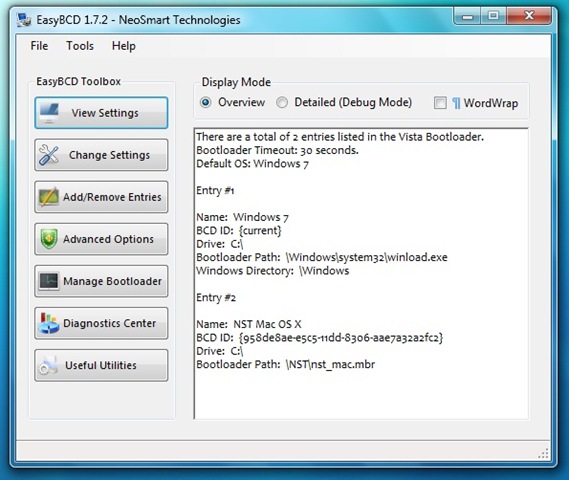
After EasyBCD is installed, follow these steps. Please make certain you are logged in with Administrator privilages:
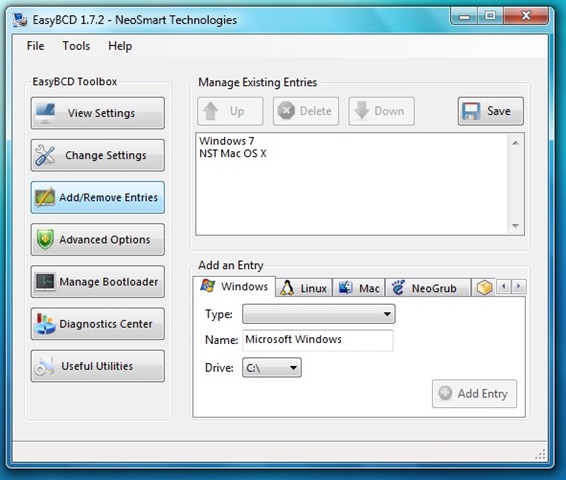
Click the Add Remove Entries button
In the Add an Entry area, click the Mac tab.
Click the Type Tab. Select Generic X86 PC
In the Name dropdown, use the name NST Mac OS X
Click the Save button in the upper right corner

6. Restart the Computer
When you restart the computer, you will see a boot loader screen. Hit the down arrow to choose the OSX entry you just created. Hit the enter key. You’re going to be taken to the Darwin Bootloader. Hit any key to stop the counter, and scroll to the OSX install, and the computer should boot to OSX.
That’s it… The only problem that I have found (if its actually a problem) is that there are two boot loaders on the Wind right now. However, I can boot to either OS at my leisure. I’ve already updated OSX to 10.5.6 and reinstalled the KVM drivers. The whole process was done in under 2 hours, and that included installs of both operating systems and updates to both.
If anyone has an easy process for installing Grub instead (or another bootloader), OR knows how to fix the dual bootloader problem I’ve created for myself, I would really love to hear from you. While this isn’t a huge problem, its kinda gimpy, and not ideal for the local Geekdom…

Chris,
There’s only 10 product keys for the Win7 beta, 5 each for the 32bit and 64bit versions. While the window to download the beta will be over soon, any of those keys can be used to activate the product at any time, up to the beta expiration in August.
@LeoLaporte Which do you like better, & have you tried this..? http://tinyurl.com/8j7rwr
Chris,
Thanks for posting this walkthrough. Your document combined with a few from the msiwind.net forums and I was able to install everything in a few hours and be fully operational shortly thereafter.
Thanks,
John
I used the info on this link; http://drewey.wordpress.com/2008/06/12/dual-booti…
I am only using the OSX boot loader and can choose between OSX and Win7.
Did your installation to no despair it did worked and now I have a great machine that i can enjoy the best of three worlds (the other one is Linux). Many thanks…….
Great tutorial! I was looking for a way to triple boot Vista, Mac OS X Leopard and Ubuntu. Once I found out how to install Ubuntu's bootloader on its own partition, it was quite easy to figure out EasyBCD. By the way, for those who want to install Ubuntu's bootloader on its own partition, there is an "advanced" button during the final options check, right before actually installing it. You will find there the option to install the bootloder to mbr or the partition, or wherever you may want.
There is a Beta build of easyBCD 2.0 that chains the osx bootloader, so you don't have to interact with the darwin bootloader.
.
I got a small problem that causes big trouble. The latest release (7022) either installs with a 200mb partition for recovery, or if I trick it into not creating it (by not formatting or partitioning the drive under the installation but before it) it fails to boot. It installs fine after OSX when I allow it to create the partition, but when I go into diskpart and set partion 2 (the recovery is always 1) as active I can't boot back to Win7 (it gives me a BCD error during boot) to run EasyBCD. Any ideas I could try?
Nevermind the previous comment, I used the new EasyBCD beta captain sparky posted the link to. My steps were even easier: Installed formatted using disk utility as you said, installed OSX, then installed Win7 (let it create the 200mb partition) but didn't go into diskpart this time. Just loaded win7, ran the EasyBCD beta and added the NST Mac OSX install, saved and reboot, both systems up and running.
Now to figure out how to chain everything so I don't have to touch darwin. Thanks!
Dude thanks, this is easier than i thought!
With Vista preinstalled on my Vaio NS 235J i didnt have this double boot loaders, but with 7 i had no other choice! but well what the hell, at least its working (no audio, no ethernet), Wifi works with a macsense usb stick with Zydas Kext…
If you have any info on how to make my audio and ethernet work on my vaio book let me know please!
Good day people!
@TiVoUpgrade http://tinyurl.com/8j7rwr is the walkthru I used.
What's the point of step 4? If I'm already booting and rebooting into Win 7 isn't it already “Active”? The first time I tried this Step 4 is what killed me. This time I'm skipping it and going to EasyBCD install.
@jolieodell http://bit.ly/Bf5EB
Dual Booting the Wind – OSX and Windows 7 ————– http://bit.ly/Bf5EB
So Ive got a question. I installed Os X and windows 7 on my PC and done all the above instructions. There might be something I missed but when i try to boot into Os X is says that the file \NST\nst_mac.mbr is missing or corrupt should I put a new NST file on the computer and if so do I make a NST File on the documents page or where should I put it? Any tips and or tricks would be AWESOME right now im about to lose my mind.
@Brainstorming ,
it sounds like something got corrupted. You might be out of luck. Try partitioning the drive, installing Windows 7 and THEN installing OSX for the Wind. The Darwin bootloader should install after that and give you the opition to boot either Windows 7 or OSX. Let me know how things go…
@ Christopher Spera
Alright thanks for the help. Ive been thinking about restarting the whole project and this is a good reason to do so. The only thing is if i partition the whole drive ill lose my HP Recovery drive im ok with this because i have the disks but if i do that them im just going for the gold. Thanks again and ill let you know what happens.
http://www.geardiary.com/2009/01/21/dual-booting-the-wind-osx-and-windows-7/
Christopher, thank you for this space. I’ve not read this guide before installing ideneb 1.3 mac os x, so installed Windows 7 ultimate (and prayed to not reinstall again mac os x). I just want to say that I`ve done all the steps from 4 to the end BUT in
DISKPART> select partition 1, I`ve changed to DISKPART> select partition 2
Then I followed the 5 and 6 procedures you wrote and happily I have windows 7 and mac os x working without erasing the apple os.
HP Mini 110-1020la (similar to 110-1030) bios f07
I'm going to give this a try : http://bit.ly/Bf5EB
thank you now i have best of two worlds!
Most of this worked, but EasyBCD 1.7 would not allow booting to the Mac. I had to run EasyBCD 2.0 (beta) and add the Mac entry as MBR. Then it worked perfectly.
QUICK question, by the way I wanted to thank you for all your great help. I hsd one more question, I needed to install windows 7 beta, but now have the original window 7 full real version that I want to add. Can I upgrade without having to do the steps all over again? Can I use the onscreen upgrade features?
You can always try it. The alternative is to blow the drive and rebuild. If things go south, you’re going to have to rebuild anyway. However, you should understand that MS normally doesn’t support an update from beta to retail version. If you had the beta on the PC, you’re going to need to blow it and reinstall that partition from scratch.
Good luck; and let me know how things go for you!
@PiPS_tweet http://bit.ly/csyrra ?7??? chain0? ? ????? ???, ?? ??? ???.
@enricop then use EasyBCD to create multi-boot screen as seen here -> http://bit.ly/csyrra then voila u in biz.
Dual Booting the Wind – OSX and Windows 7 | Gear Diary http://bit.ly/egf50Y