
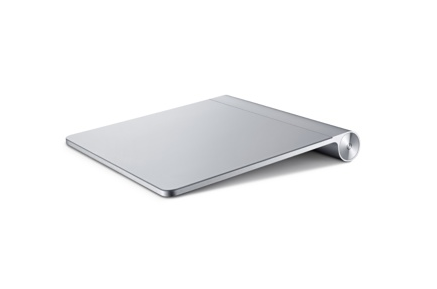
At long last Apple has released a standalone trackpad that brings the MacBook Pro controller to your iMac, Mac Mini and Mac Pro but goes one better by almost doubling the size of the trackpad. As the Apple store notes-
Magic Trackpad gives you a whole new way to control what’s on your Mac desktop computer. When you perform gestures, you actually interact with what’s on your screen. You feel closer to your content, and moving around feels completely natural. Swiping through pages on screen is just like flipping through pages in a magazine, and inertial scrolling senses the momentum in your fingers as you move up and down a page.
It’s made with smooth, wear-resistant glass that feels great to the touch. And it’s nearly 80 percent larger than the built-in trackpad on the MacBook Pro, giving you plenty of room to perform gestures. Because the entire surface of Magic Trackpad is a button, you can click on objects just as you would using a traditional mouse. And Magic Trackpad sits at the same height and angle as the Apple Wireless Keyboard, so you can go from trackpad to keyboard in one seamless motion.
When Apple released the Magic Mouse I was a bit disappointed. While it was a step in the right direction it was just a step. At the time I wrote that what I really wanted was… exactly what Apple just released. I love the trackpad on my MacBook Pro and can’t wait to get my hands on one of these.
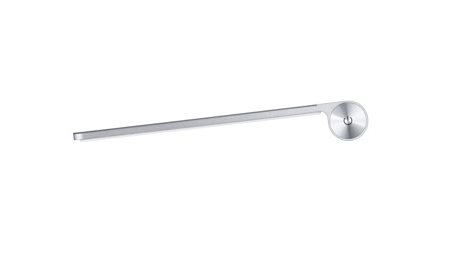
The Magic Trackpad is $69 and is shipping now.
Also notable is the release of the Apple Battery charger for $29.



I caught a quick look at the official page and there are loads of control panel options for this. I am hoping that they finally give the ability to simultaneously left & right click … I hate having to keep a wired mouse around for gaming!
Larry and I both ordered (surprised? not…)
I for one can’t wait.
Do you use any apps that require simultaneous right & left clicks? I would be interested in seeing how it works in that situation (heck, it was nice to see a dedicated right-click area!). Unlike the Magic Mouse, I also have a strong pull to order this …
None that require the dual touch. It is on the way so we’ll have a better sense soon.
geardiary: Apple Launches Magic Trackpad $AAPL – http://www.geardiary.com/2010/07/27/apple-launches-the-magic-trackpad/
So one wonders: will they enable support for it on the iPad? How about the iPhone?
Now Available? HA!
A guy walks into the Apple Store…OK, I walk into the Apple Store (which i had not been in lately and wow, have things changed) and the girl enters me into her iPad and says to wait around this area. Pfffft, nothing to see or do in “this area” so my ADHD kicks in and I being exploring. It was kind of like telling a kid in a candy store not to go near the candy.
“Hello, my name is ….” comes over and asks what I how he can help today. I state “magic trackpad, please.” “Oh, those haven’t come in and we don’t know when we are going to get them.” Fine, I will just take my business elsewher……Hey, how much is this new iMac?”
So, the $69 magic trackpad cost me about $1,300 bucks, and I didn’t even come home with a Magic Trackpad!!
But this new iMac i am posting this on sure is sweet and took like, two minutes to fire up and get going. Sweet.
Now available as in “now available to order and have shipped to you immediately”
Not “now available and in stores now” 🙂
From $69 to $1300. We’ve all been there in some form or another.
New iMac… Awesome. Enjoy it.
Apple Launches the Magic Trackpad http://bit.ly/cWwju2
RT @GiantGizmoNews: Apple Launches the Magic Trackpad http://bit.ly/cWwju2
And this magic mouse thingy is pretty cool too.